PDF Diva icon
PDF Diva icon

PDF Diva

A presenter view for any PDF: the slide on the projector, and the current slide, the next one and a timer on the speaker's screen.
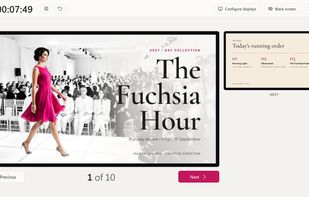
Speaker view

Cost / License

Platforms

  • Windows  Windows 10 and 11, from the Microsoft Store or with an unsigned installer from GitHub.
  • Linux  a .deb for Debian, Ubuntu and derivatives (64-bit), running on X11.
  • Mac  macOS 13 or later, Apple silicon and Intel; not notarized, so the first time it needs Open Anyway in Privacy & Security.
0likes
0articles
Save

Features

Properties

Features

Highlights All activities

PDF Diva News & Activities

Recent activities

PDF Diva information

AlternativeTo Category

Office & Productivity

GitHub repository

  •  0 Stars
  •  0 Forks
  •  0 Open Issues
  •   Updated  
View on GitHub
PDF Diva was added to AlternativeTo by Nilo Vélez on and this page was last updated .

No comments or reviews, maybe you want to be first?

Official Links

What is PDF Diva?

PDF Diva presents a PDF like any slide deck. The audience sees the slide full screen on black, with no controls. The speaker sees the current slide, the next one, a timer and the page count, readable at a distance and in a dark room.

It was made for venue technicians and video operators: the tool you keep installed for when a speaker turns up with a PDF. It uses the standard presentation keys (Page Up, Page Down, the arrow keys, F5, B for a black screen), so any presentation remote works.

Each display can show the slide or a speaker view, for example one for the technician and one for the speaker, and that can be changed during the talk without stopping it. If a display is disconnected, the presentation carries on.

It needs no setup and no other software: the PDF renderer is built in. No account, no telemetry and no internet connection. Interface in eight languages.

PDF Diva Videos

