
PCWattVault icon
PCWattVault icon

PCWattVault

A Windows PC power consumption monitor that prices every watt with your own electricity tariff: live watts per component and per app, plus a permanent local history.
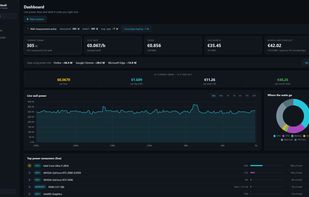
Live power draw in watts and what it costs you per hour, with every consumer ranked: each GPU separately, CPU, RAM and every drive.

Cost / License

  • Free
  • Proprietary

Platforms

  • Windows
1like
0articles
Save

Features

Properties

  1.  Privacy focused

Features

  1.  No registration required
  2.  Ad-free
  3.  No Tracking
  4.  Dark Mode
  5.  Works Offline
  6.  Battery Monitor
  7.  Hardware Monitoring
  8.  Power monitoring

PCWattVault News & Activities

Highlights All activities

Recent activities

PCWattVault information

  • Developed by

    GR flagtmnetworks.gr
  • Licensing

    Proprietary and Free product.
  • Alternatives

    6 alternatives listed
  • Badge

    Get an embeddable badge for PCWattVault
  • Supported Languages

    • English
    • Greek
    • German
    • French
    • Spanish
    • Italian
    • Portuguese
    • Polish
    • Dutch
    • Turkish
    • Russian
    • Ukrainian
    • Chinese
    • Japanese
    • Thai
    • Vietnamese
PCWattVault was added to AlternativeTo by Stamatis on and this page was last updated .

No comments or reviews, maybe you want to be first?

Official Links

What is PCWattVault?

PCWattVault shows how much electricity your Windows PC uses and what it costs you, live and over months.

It reads the PC's own power sensors, prices every watt-hour with your own electricity tariff, and keeps a permanent local history per hour, day, month and component.

Key features:

  • Live power draw in watts, updated every second, always marked as measured or estimated ("~")
  • Every consumer ranked live: each GPU separately, CPU, RAM, every drive
  • Power per app: which apps draw the power, what each one cost per day, and the change from the week before
  • Real tariffs: day/night windows, tiers, seasonal rules, solar hours, demand charges, any currency
  • History by hour, day, month and lifetime, in kWh or money, with a month-end forecast
  • Laptops: power measured from the battery itself, time left at the current draw, and battery health
  • Optional TP-Link Tapo P110/P115 smart plug for a real wall measurement and one-click calibration
  • Alerts for power, temperature, daily cost and a single app's power or cost; CSV export and PDF reports
  • Runs quietly in the notification area, so the history has no gaps

GPU power is measured from the first launch. CPU power starts as an estimate; running the free LibreHardwareMonitor alongside turns it into a measurement.

Private by design: no account, no cloud, no telemetry. The history is plain JSON files on your own disk.

Free on the Microsoft Store, in 17 languages. Some features are labelled Pro; every Pro feature is currently free, and early adopters keep them for good.