

Pasteon
Clipboard history remains searchable and actionable with local network sync, no cloud, content-aware actions, OCR, previews, batch copy, merge, split, paste queue, keyboard controls, URL cleanup, metadata inspection, color conversions, and privacy.
Cost / License
- Freemium (Pay once or Subscription)
- Proprietary
Application type
Platforms
- Mac
Features
Properties
- Local-First
Features
- Pastebin
- Share Clipboard
Pasteon News & Activities
Recent activities
Pasteon information
What is Pasteon?
Pasteon is a software for managing clipboard history on Mac systems. It provides a searchable clipboard history, synchronized across multiple Macs on a local network, prioritizing user privacy by avoiding cloud services or third-party relays. It recognizes copied content and offers contextual actions for various data types, including images, links, files, text, and structured data. The software is fast, with a keyboard-first workflow and rich previews before pasting.
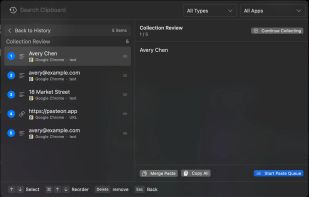
Pasteon offers functionalities like Optical Character Recognition (OCR), metadata inspection, and image sending. It enables users to convert color formats, clean URLs, and copy across multiple apps. Users can also start a temporary collection, continue copying, and then review and send the ordered items to Merge Paste or Paste Queue. It supports various content types in Collect Mode, including text, URL, JSON, Markdown, HTML, color, date, and timestamp.
The software allows users to split or merge clips, reshape copied content before pasting, and split copied text into separate items for quick repeated pasting across platforms. Users can sync their clipboard history across multiple Macs on the same local network without the need for a cloud account or third-party relay. It also offers a command feature, where users can press Command K to search and run Pasteon commands without leaving their keyboard. Users can filter clipboard history by content type or source app, and launch workflows when the selected content supports it.


