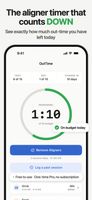
OutTime is a wear-time timer for anyone in clear aligners. Most aligner apps count up how long you have worn your aligners today and leave you to do the subtraction. OutTime does the opposite: you set the daily out-time budget your orthodontist gave you, and the app counts it down every time your aligners come out. At a glance you know you have 47 minutes left today, rather than that you have worn them for 18 hours and 22 minutes.
OutTime is a personal timer and does not provide medical advice. Always follow your orthodontist's instructions.
It works with any brand: Invisalign, Angel Aligner, Spark, ClearCorrect, Byte and every other clear aligner.
PRIVACY
No account, no email, no OutTime server, and no analytics of any kind. No third-party SDKs, no ad networks, no crash reporters. Everything lives on your iPhone. The App Store privacy label reads "Data Not Collected". Optional iCloud Backup & Restore (Pro) keeps a copy in your own private iCloud, which the developer still cannot see.
PRICING
The free tier is free forever, with no ads and no trial. One optional in-app purchase unlocks Pro for $9.99, once. There is no subscription, and Family Sharing is included.
FREE
- Countdown timer with a daily out-time budget
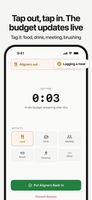
- Activity tags on every session (Food, Drink, Meeting, Brush, Exercise, Other)
- Break Types stats, so you can see where your out-time actually goes
- 7-day average, streaks, and current plus previous tray stats
- Your last 30 days of stats and calendar, day by day
- Every session you have ever logged, in View All History
- Retroactive editing: fix a session you forgot to stop, or log one you missed
- Tray calendar with per-tray day lengths, extend and delay
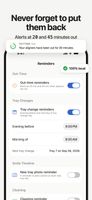
- Out-time and tray-change reminders
- Hands-free Siri commands, including the Action Button
- Your first Smile Timeline photo
PRO, $9.99 ONCE
- Apple Watch app and complications
- Home Screen widgets
- Lock Screen countdown during out-time sessions
- Smile Timeline: unlimited photos, side-by-side sharing, MP4 timelapse export
- Wear-Time Summary PDF for any month, plus CSV export
- Full stats history, back to day one
- Cleaning and appointment reminders
- iCloud Backup & Restore (optional, off by default)
- Six alternate app icons
RETAINER MODE
When treatment ends, switch to retainer mode, full-time or nights-only, with its own bedtime and replacement reminders.
REQUIREMENTS
iPhone running iOS 18.4 or later. The Apple Watch app requires watchOS 10.0 or later. There is no Android version.
For informational purposes only. Follow your orthodontist's guidance.









 EU

 egeorgiev added OutTime as alternative to 22 Hours, Tray With Me and Trayminder

 Emil Georgiev


No comments or reviews, maybe you want to be first?