Osenpa PDF Tools icon

Osenpa PDF Tools

Free Windows PDF toolkit for merging, splitting, organizing, compressing, converting and OCR, with visible signatures, password controls and metadata cleanup.
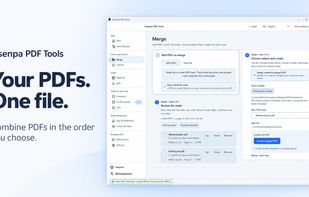
Product visual: arrange PDFs in the required order and create a separate merged file.

Cost / License

  • Free
  • Proprietary

Platforms

  • Windows  Windows 10 version 2004 (build 19041) or later, or Windows 11; x64. OCR needs the selected language components.
0likes
0articles
Save

Features

Features

Highlights All activities

Osenpa PDF Tools News & Activities

Recent activities

Osenpa PDF Tools information

  • Developed by

    Osenpa
  • Licensing

    Proprietary and Free product.
  • Alternatives

    9 alternatives listed
  • Badge

    Get an embeddable badge for Osenpa PDF Tools
  • Supported Languages

    • English
    • Turkish
    • German
    • Spanish
    • French
    • Italian
    • Portuguese
    • Russian
    • Arabic
    • Hebrew
    • Hindi
    • Indonesian
    • Japanese
    • Korean
    • Vietnamese
    • Chinese
Osenpa PDF Tools was added to AlternativeTo by osenpa on and this page was last updated .

No comments or reviews, maybe you want to be first?

Official Links

What is Osenpa PDF Tools?

Osenpa PDF Tools provides focused local tools for everyday PDF tasks. Merge files, split by page ranges or selected pages, and reorder, rotate, remove or extract pages. Compress copies, convert supported images to PDF, or export PDF pages as JPG or PNG.

OCR can create searchable PDFs or UTF-8 text after the required language components are installed. Fix Documents, labeled beta, corrects photographed-page perspective, curve, rotation, shadows and uneven lighting. Smart Recipes prepare reviewable starting workflows, and a session-based Batch Queue groups jobs.

Other tools add visible signatures or watermarks, set an open password, remove a known password and clean supported metadata. A visible signature is not a certificate-based digital signature, and metadata cleanup is not redaction.

This is not a full PDF text and layout editor. OCR and corrected pages need review; compression cannot guarantee an exact size. Merging does not preserve source bookmarks, and the queue is not restored after closing the app.

Processing runs locally without uploading PDFs or images. Update checks, supporter requests and user-selected component downloads are separate network actions.