


Optimal Desktop for macOS
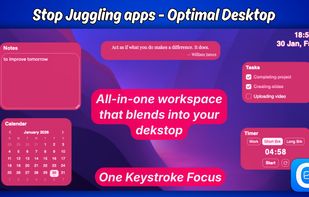
A native, lightweight and one key stroke-access productive workspace that blends into your desktop — Optimal Desktop.
Cost / License
- Pay once
- Proprietary
Platforms
- Mac


Features
Properties
- Distraction-free
- Privacy focused
- Lightweight
- Support for Themes
Features
- Works Offline
- No registration required
- Reminders
- Goal Tracking
- Dark Mode
- No Tracking
- Goal Setting
- Kanban Board
- Pomodoro Timer
- Task Time Tracking
- Recurring Tasks
- No Coding Required
- Calendar View
- Calendar Integration
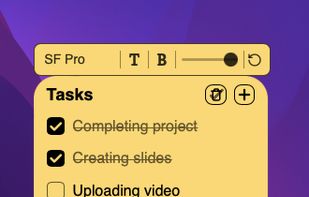
- Sticky Notes
- Desktop Application
Tags
- Productivity Tool
- workspace
- MacOs
- productivity
Optimal Desktop for macOS News & Activities
Recent activities
- Everlive_Labs added Optimal Desktop for macOS
 Everlive_Labs added Optimal Desktop for macOS as alternative to Notion
Optimal Desktop for macOS information
Developed by
 Everlive Labs
 Licensing
Proprietary and Commercial product.Pricing
One time purchase (perpetual license) ranging between $12 and $15.Alternatives
1 alternatives listedSupported Languages
- English
What is Optimal Desktop for macOS?
Hello everyone, While being in the work flow I always wanted a way to capture my thoughts or access my tasks instantly. Without the need to open apps and switch windows. And wondering if anything can be done with the empty desktop background like sticking notes on it just like the physical sticky notes which will be easily accessible on desktop background while working. So did some research, whether any existing app or software is there or not, what are the ways to implement the idea. So after months of research, logic and execution. Presenting Optimal Desktop - a lightweight all-in-one productive workspace for macOS.
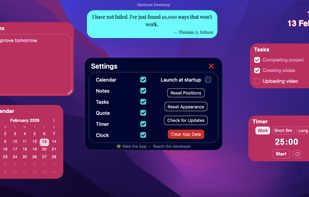
It has: Seamless Underlay (shortcut key): Always active, living persistently on the desktop. Infinite Layout Flexibility: Drag-and-drop positioning and widget customisation with total freedom. Smart Layout Persistence: Every Widgets' position and appearance is auto-saved instantly and stays exactly where you left them across sessions. Integrated Data Storage: All user content (Tasks, Notes, etc…) is auto-saved instantly locally. Universal: Native for both Intel and Apple silicon chips.
Welcome to Optimal Desktop.