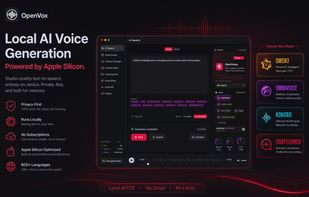
Create realistic AI voices in 600+ languages with 300+ voices, cloning, and emotional expression. All processed locally on your Apple Silicon Mac with complete privacy.
Transform any text into natural, expressive speech — entirely on your Apple Silicon Mac. OpenVox is a privacy-first, local AI text-to-speech app optimized for Apple Silicon.
Why OpenVox?
Privacy-First by Design
All processing happens locally on your Mac. After a one-time model download, OpenVox does not initiate network requests for generation or processing.
No account required. No telemetry. No analytics. No third-party trackers.
All data stored locally using SwiftData.
Made to run on Apple Silicon
Powered by MLX acceleration for M1, M2, M3, M4 and newer chips.
Near-instant generation for most inputs. Optimized memory usage for smooth performance.
300+ Voices for 600+ languages!
Four powerful AI models:
OmniVoice — next-gen model for ultra-realistic, expressive, and context-aware speech with voice cloning
Qwen3 TTS — best for realism and voice cloning
Kokoro — fast, stable, ideal for long content
Chatterbox — expressive, emotional, multilingual
Offline-Ready
After initial model download from HuggingFace, everything runs locally. Perfect for travel, secure environments, or sensitive documents.
Core Features
AI Speech Generation
• 300+ voices across 600+ languages
• Advanced controls: speed (0.5x–2.0x), temperature, CFG weight, exaggeration
• Silence removal and audio normalization
• Built-in audio preview
• Automatic chunking for long text
AI Voice Design
• Create new voices by just describing them
• Free: 10 Voice Designs
• Pro: Unlimited
• Perfect for creating voices for your characters
Audiobook Generator
• Import EPUB, PDF or text files
• Chapter-by-chapter management
• Batch processing (Pro)
• Per-chapter voice customization
Voice Changer
• Transform MP3 or WAV audio into different voices
• Free: 100 seconds/day
• Pro: Unlimited
Conversations
• Create multi-speaker scripts with up to 4 voices in one generation
• Perfect for interviews, podcasts, skits, dialogues, and character scenes
• Assign a different voice to each speaker
• Import .txt and .pdf scripts directly
• Adjustable pause length between dialogue lines
Voice Cloning
• Clone voices from your own recordings
• Free: 3 clones
• Pro: Unlimited
• 100% local processing
Local API
• Integrate all OpenVox models and 300+ voices directly into your apps and workflows.
• Optimized for real-time applications like AI agents, assistants, and automation.
• Unlimited API usage on your own hardware.
Generation History
• Saved locally on your Mac
• Search, replay, export, or delete
• No cloud sync
Audio Export
• Free: WAV (24kHz)
• Pro: WAV + MP3
• Commercial use allowed
Download OpenVox and experience text-to-speech the way it should be — private, powerful, and fully under your control.







 Danilo Venom added OpenVox as alternative to DeepFakeAI, AI Voice Cloning and Free Voice Cloning
 brickelt963-altto added OpenVox as alternative to Supertonic TTS
 Vaniv Studio added OpenVox as alternative to VANIV Studio
 Paul added OpenVox as alternative to Voxtral, VoiceCraft, X to Voice, Balabolka and 47 more


 Nitesh Kumar Sharma


No comments or reviews, maybe you want to be first?