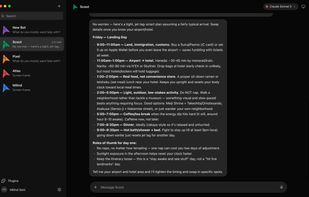
OpenMausBot is a free, open-source, local-first desktop app that treats AI agents like a messaging team. The interface looks like WhatsApp or Telegram: a sidebar of contacts. Every contact is a real agent that can do work, not just chat.
It is an independent, open-source take on Grok Bot. It keeps the same idea — AI as a roster of bots you message — but rebuilds it local-first, on the tools you already have, with no extra plan and no vendor lock-in. It is not affiliated with xAI.
Bots run on the claude, codex, and grok CLIs installed on your computer, using the logins and subscriptions you already pay for. You can also paste API keys or point a bot at a custom ACP agent or any OpenAI-compatible endpoint, including local setups such as Ollama, LM Studio, or vLLM. There is no OpenMausBot account and no proxy in the middle: you pay model providers directly.
A small harness server on 127.0.0.1 owns every agent process and turns each provider’s protocol into one event stream. Transcripts, keys, and events stay in ~/.openmausbot on your disk. Secrets are write-only in the UI: the app only shows whether a provider is configured.
Each bot has its own identity, personality, model, thread memory, optional computer, and tools. You can switch a bot’s model mid-conversation. Bots can talk to each other in group channels with @mentions and one-hop peer delegation. You can also import a whole team from a portable Markdown playbook.
When a bot needs to run a shell command, edit a file, or take a risky action, it asks first. Allow / Deny cards appear in the chat. Nothing sensitive runs silently.
Every bot can get a computer: a cloud Linux desktop with a live screen preview, an isolated local VM, or — after explicit opt-in — the host machine on macOS and Ubuntu Xorg. You can watch it work, or open the desktop in a browser and take over.
Connected apps go through Composio: Gmail, Slack, GitHub, Notion, Linear and 500+ others. OAuth once at workspace level, then every bot can use those tools. A local MCP server lets other MCP clients inspect bots, send work, and wait for a conversation to settle, without approving actions or touching credentials.
Voice is optional. Native on-device dictation works in the macOS composer. Text-to-speech and call mode use your own ElevenLabs key. Routines can run on a schedule, including every-X-minutes jobs. iOS and Android companion apps let you read and answer from a phone once paired with a running computer.
Desktop builds embed the harness, so there is nothing else to install: download, add a key or an existing CLI login, and create a bot. You can also self-host the server with Docker on a VPS or home machine and connect from other devices. The project is Apache 2.0 and runs on Windows, macOS, and Linux.




 Kacper-W-odarczyk added OpenMausBot as alternative to AgenticOS
 Paul added OpenMausBot as alternative to Meta Muse
 scorpion7slayer added OpenMausBot as alternative to OpenClaw, Claude, Microsoft Copilot, Hermes Agent and 21 more


No comments or reviews, maybe you want to be first?