openGym icon
openGym icon

openGym

Self-hosted gym & body-weight tracker — plan routines, log workouts (supersets, warm-ups, cardio), see which muscles are trained, fatigued or detrained, import from FitNotes/Strong/Hevy, passkey login. Your data, your server.
openGym screenshot 1
openGym screenshot 2
+2
openGym screenshot 3

Cost / License

Application type

Platforms

  • Self-Hosted
  • Docker
  • Android
  • Android Tablet
5likes
0articles
Save

Features

Properties

  1.  Privacy focused

Features

  1.  Biometric Authentication
  2.  Dark Mode
  3.  Workout Schedule
  4.  No Tracking
  5.  Ad-free
  6.  Custom Workouts
  7.  Passkey Support
  8.  Progress tracking
  9.  OpenAPI Integration

openGym News & Activities

Highlights All activities

Recent activities

openGym information

AlternativeTo Categories

Sport & Health, Security & Privacy, AI Tools & Services

GitHub repository

  •  8,317 Stars
  •  1,047 Forks
  •  156 Open Issues
  •   Updated  
View on GitHub

Popular alternatives

View all
openGym was added to AlternativeTo by Paul on and this page was last updated .

No comments or reviews, maybe you want to be first?

Official Links

What is openGym?

A self-hosted gym and body-weight tracker you actually own.

Plan your week, run guided workouts, log every set and your body weight, on your phone, synced across your devices, behind your own passkey login.

Features:

Planning

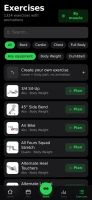
  • A routine per weekday over a library of 1,324 exercises with animated demos, searchable and browsable by muscle on a body map. Filter by the equipment you own.
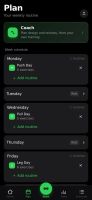
  • Four starter plans (Push/Pull/Legs, Upper/Lower, Full Body, 5×5) that load as ordinary, editable routines.
  • Move a session to another day without touching the weekly plan. The week starts on Monday or Sunday, your choice.
  • Or skip the weekdays altogether: a rotation (A, B, C, A, ...) where the next session is simply the next one you haven't done, however the week went.
  • Supersets, warm-up sets, drop sets and rest-pause, timed exercises (planks, hangs, carries), cardio by time and speed, rest time per exercise, planned deloads.
  • Your own exercises, with your own photo, GIF or short video. Location data is stripped on the device before upload.

Training

  • Guided sessions: today's workout starts itself, weights are pre-filled from last time, a rest timer runs between sets, PRs are detected as you go. On a rest day it tells you when the next session is.
  • A quiet workout screen: one menu per exercise, the set number as the set's own menu, card or list view. Switches in Settings bring the old button rows back if you liked them.
  • Optional effort column as RIR or RPE, colour-coded, with a plain-language line per level.
  • Plate math for barbell, EZ bar, trap bar and Smith machine, worked out from the plates you own.
  • Bodyweight exercises know they carry no load: log reps, add a dip belt if you use one.
  • Per-side reps for lunges and single-arm work, the screen stays awake while you train, and a rest-timer alert can flash the screen for loud gyms.
  • Swipe a set left to delete it (with Undo) or right to copy it. Pyramid sets with their own reps and rest per set, and a scroll wheel for any rest time up to 15 minutes.

Progress

  • Progression rules per routine or per exercise: linear, Greyskull LP, double progression through a visible rep range, or adding time. Each target explains why it is that number; missed reps never add load, stalls trigger a deload.
  • Estimated 1RM per exercise with its own curve, Structural Balance ratios (Poliquin, Thibaudeau, ATG), a year-long activity heatmap.
  • A muscle map in three modes: where your volume went, what is still recovering, and what has gone untrained.
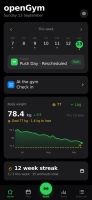
  • Body-weight chart against a goal line, and progress photos on a timeline with a before/after slider.
  • Edit any saved workout after the fact, log one you did on paper, or move it to the right date. Records are re-read from the corrected history.