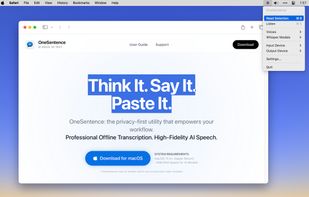
Think It. Say It. Paste It.
OneSentence is a privacy-first voice utility for macOS. It combines the world’s most accurate speech recognition with natural, diffusion-based speech synthesis—all running locally on your Mac. No data ever leaves your device. No cloud. Flexible pricing. No compromises.
PROFESSIONAL DICTATION (Speech-to-Text) - 57 Languages Supported
Experience the power of OpenAI’s Whisper model directly in your menu bar. OneSentence transforms your speech into text with industry-leading accuracy, even in noisy environments.
• World-Class Accuracy: Choose from Tiny to Large-v3-turbo models. Achieves a Word Error Rate (WER) of less than 50% on 57 languages.
• Fast Workflow: Press Cmd+5 to record. Your transcription appears in your clipboard, ready to paste into ChatGPT, Claude, Slack, or any editor.
• Non-Destructive: Preserves your existing clipboard history while you work.
• Saves History: Optionally saves your transcription history.
• Snippet Menu: Paste predefined snippets anywhere on your mac.
STOP SCANNING, START LISTENING - Specialized English Narration (TTS)
Turn emails, research papers, and long English articles into high-quality narrated experiences using the Supertonic Engine.
• Human-Like Voices: English-only; uses diffusion-based AI to provide professional, natural-sounding narrators.
• System-Wide Access: Highlight text in any app and press Cmd+6 to listen on demand.
• Audio Controls: Adjust playback speed and synthesis quality (Diffusion Steps) to suit your preference..
BUILT FOR APPLE SILICON
OneSentence is a native SwiftUI app optimized for the GPU and Apple Neural Engine of M1, M2, M3, and M4 chips.
• Adaptive Orchestration: Dynamically switches between Metal (GPU) for instant captures under 3 minutes and the Apple Neural Engine for longer recordings to maximize battery efficiency.
• Privacy by Design: Your voice and text remain 100% private and offline.
DESIGNED FOR POWER USERS
• Lightweight Menu Bar App: Stays out of your way until you need it.
• Global Hotkeys: Trigger transcription or reading with a single keystroke.
• No Hidden Costs: Choose between a one-time perpetual license or a low-cost subscription. Both include a free 15-day trial.
REQUIREMENTS
• macOS 13.3 or later.
• Optimized for Apple Silicon (M-series).
• Approximately 4GB of disk space required for the best AI models (downloaded securely on-demand).






 snowy-code-owl added OneSentence as alternative to MacWhisper, Handy STT, Vibe Transcribe, OpenWhispr and 7 more
 OneSentence


No comments or reviews, maybe you want to be first?