The app is designed for Microsoft 365 work and school accounts. Personal Microsoft accounts (OneDrive on outlook.com) are not supported.
NO SYNCING
Files stay in the cloud and open instantly: zero disk space, no initial download, no “conflicted copies”.
QUICK START
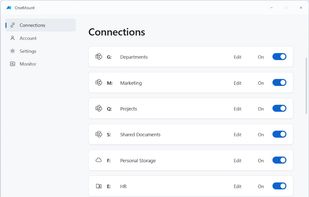
Install and sign in — no Azure app registrations, no admin consent. OneMount finds SharePoint sites, Teams libraries, your work OneDrive and shared folders; what you pick becomes a drive.
REAL CO-AUTHORING
Word and Excel open documents as cloud files: co-authoring, AutoSave and version history just work.
FOR ORGANIZATIONS
Terabyte-scale libraries with millions of files. Administrators configure users' drives centrally from the management portal, and the configuration syncs across a user's computers. Policy-based management, deployment via Intune, per-user licensing.
RELIABILITY
Automatic connection recovery, silent sign-in renewal, and warnings about over-long paths that File Explorer silently hides.
TRIAL AND SUBSCRIPTION
14 days free with all features. Then a subscription: USD 3.99/month or USD 39.99/year.
More details, documentation and support at onemount.app.
Windows 10 (1809) / Windows 11. Requires a Microsoft 365 work or school account.
SharePoint, OneDrive, Teams and Microsoft 365 are trademarks of Microsoft Corporation. OneMount is an independent app by SkylFlow.







 Vitalii Mokhnenko added OneMount as alternative to Microsoft OneDrive

 SkylFlow
No comments or reviews, maybe you want to be first?