BUILD YOUR OWN WIDGETS
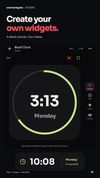
Start with a blank canvas, an editable template or guided steps. Add text, images, icons, shapes and live data. Quick blocks help you begin with a clock, weather, battery, music, calendar or photo. Studio has 20 editable templates; the 500+ collection is the separate ready-made catalogue.
Add battery temperature, voltage, current and power, plus RAM, storage, display, sound, connection and device information. Use ready-formatted readings or numeric values in formulas.
CONTROL EVERY DETAIL
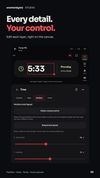
Move layers with X/Y sliders or exact values. Drag to reorder, group, align, hide, lock or delete them. Mix colors with HSV, RGB and opacity sliders. Adjust fonts, spacing, size and corners. Preview as you work, autosave your draft and undo changes. Choose resize anchors for the whole widget and individual layers, with fixed or scaling text sizes.
500+ WIDGETS FOR YOUR HOME SCREEN
• Clock widgets: digital, analog, flip, minimal clocks and the Bezel collection.
• Weather widgets: current conditions, hourly forecasts, wind, humidity and daylight.
• Photo and music widgets: your pictures, live album art and playback controls.
• Calendar widgets: dates, weeks, month views, agendas and countdowns.
• Battery and activity widgets: charge, steps, calories and daily progress.
• Notes, to-do lists, focus tools, quotes, stocks, currency and device information.
The collection includes free and Pro designs.
MATCH YOUR STYLE
Create a minimal, dark or colorful home screen. Use transparent, photo, gradient or glass backgrounds. Fill a resized widget with a photo or album art while the content keeps its proportions. Add effects to one layer or the whole design, including Relief and Surface. Experimental GIF backgrounds include a still-image fallback. Advanced tools include imported fonts, SVG artwork, reusable blocks, formulas and optional web data. Give the background its own tap action, or disable background taps.
PROJECTS AND WIDGET PACKS
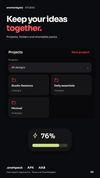
Keep designs in project folders and create size variants. Share designs or .one4pack collections. Pro lets makers export signed companion APK/AAB packs with their assets and signing-key backup. Pack apps require One4Widgets; authors publish through their own Play account.
WORKS WITH ONE4HOME
With a compatible One4Home build, basic Studio widgets have unlimited free placements. Follow Home colors, fonts and corners, use native Acrylic or Glass, and preview on its wallpaper and grid. Share selected Studio designs with a Home setup. One4Home Pro and One4Widgets Pro are separate purchases.









 GabrielDja added One4Widgets as alternative to KWGT Kustom Widget Maker

 One4Studio

No comments or reviews, maybe you want to be first?