OmniScan is a small, fast, free and open-source (MIT) scanning app for Windows flatbed scanners. It is one portable file: nothing to install, no .NET runtime needed, settings in a plain INI file next to the program.
Share a USB scanner with the whole home. Turn on sharing on the PC the scanner is plugged into, and OmniScan on every other PC lists that scanner as its own: no drivers, no setup, no accounts. A busy scanner is shown with a red dot, and a scan from another PC never takes whatever lies on the glass.
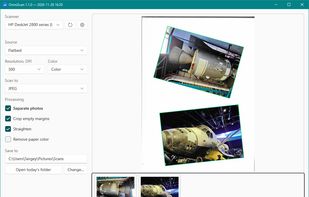
It sorts out what lies on the glass:
- Photos: several photos laid any old way are found, cut out, straightened and saved one per file. The frames can be adjusted on the preview before scanning.
- Documents: margins removed, skew and page orientation corrected, using the text recognition built into Windows, on your computer.
- Stickers: cut out along their outline, with a clean white border, onto a transparent PNG.
- Colored paper made white, like a copier does it.
Multi-page PDF without a dialog: after each page a card says what comes next. Rescan, remove or insert pages, skip blank ones; the same sheet scanned twice is noticed; pages can be added to the last saved PDF later.
Scans you can find again (optional, off by default): with your own OpenAI, Google AI Studio or DeepSeek key, photos are turned upright and every photo and PDF gets a short searchable description, written to the file properties, the PDF title and descript.ion.
Also: day folders with safe automatic names (files are never overwritten), a results strip with a viewer, automatic updates from GitHub, 29 UI languages, light and dark theme. Works with any scanner that has a WIA driver, on Windows 10 (1809+) and 11, 64-bit.








 sensboston added OmniScan.NET as alternative to Image Capture, ScanBridge, Simple Scan, OpenScan and 4 more




No comments or reviews, maybe you want to be first?