OmniDICOM is a desktop DICOM viewer and metadata editor for medical imaging research and education, on Apple silicon Macs (macOS 13 or later) and 64-bit Windows 10 and 11.
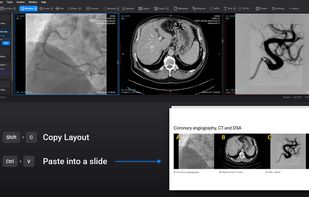
Open folders, DICOMDIR discs and multi-frame studies; compare series side by side with synchronized navigation; play cine runs; and measure distances, angles and regions. Explore axial, coronal and sagittal planes, MIP and 3D volume rendering, and cut a volume with the scalpel. Subtract a mask on angiographic runs (DSA), overlay PET on CT, open structured reports, and search, retrieve and send studies over PACS and DICOMweb. Inspect and edit DICOM tags across a series. Export DICOM, images, movies, NIfTI volumes and STL models. Copy one image, or every visible panel as one labelled picture, to the clipboard, ready to paste into PowerPoint slides. De-identify a copy of a study or series with new UIDs while keeping the originals unchanged; text burned into image pixels must be checked separately.
Professional adds Denoise for CT and MR series and X-ray images (CR, DX, DR and RG; macOS 14 or later on a Mac), which reduces noise on your own computer without uploading images or changing the DICOM files; Process, ordered chains of up to eight filters with typed values and presets; and Analyze: ROI statistics, histograms, profiles, time-intensity curves and Excel and CSV export.
Windows users can install OmniDICOM from the Microsoft Store. Mac users can download the signed, notarized PKG from the official website.
Every computer gets a 14-day Professional trial on its first internet-connected launch; trial exports carry a watermark and STL export needs a paid licence. Basic and Professional are subscriptions, per computer. For research and education only; OmniDICOM is not a medical device and is not intended for diagnosis.






No comments or reviews, maybe you want to be first?