

Oh-heck icon
Oh-heck icon

Oh-heck

Generate terminal commands from natural language using GPT-3.
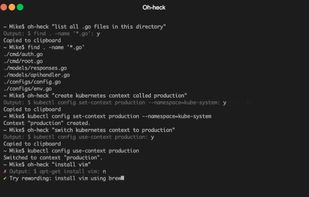
Oh-heck screenshot 1

Cost / License

  • Free
  • Open Source

Platforms

  • Mac
  • Linux
2likes
0alternatives
0articles

Features

  1.  Command line interface

Oh-heck News & Activities

Highlights All activities

Recent activities

  • bnchndlr liked Oh-heck

Oh-heck information

AlternativeTo Category

OS & Utilities

GitHub repository

  •  171 Stars
  •  2 Forks
  •  0 Open Issues
  •   Updated  
View on GitHub

Our users have written 1 comments and reviews about Oh-heck, and it has gotten 2 likes

Oh-heck was added to AlternativeTo by Paul on and this page was last updated .

Comments and Reviews

   
Top Positive Comment
Ted Curran
0

This is something I'd need.

Official Links

What is Oh-heck?

Oh heck! What are those pesky terminal commands?! Generate terminal commands from natural language using GPT-3. Now you don't have to google the same command for the umpteenth time.

Using oh-heck is simple. All you have to do is call it and send your question as the only parameter (in quotes).

oh-heck "How do I install vim using brew?"

The AI will then return its best guess and you can accept this by typing in 'y' or 'n'. If you accept it, the command will be copied to your clipboard for you to paste into Terminal. If you reject it, you can edit your question to try and get a different output. Press 'Ctrl + c' at any time to exit the application.

? Output: $ brew install vim? [y/N]

But, Mike! What happens if I can't remember the oh-heck commands? Well, first, calm yourself. Once you've regained your composure, just type oh-heck into Terminal and follow the steps.