ObtainX builds on everything Obtainium does well — same sources, same trust model, same spirit — with a reworked UI and a set of features aimed at making everyday use a little smoother.
? New Features
Features that don't exist in Obtainium at all.
📥 Bulk Import from Device — Select any apps already on your phone and ObtainX automatically finds their sources on stores you choose. No URL hunting, one by one.
📦 Installer choice — A Third-Party install path lets you send APKs to any installer you trust (InstallerX, App Manager, etc.). Particularly useful when you can't grant "install unknown apps" to normal apps — for example, under Advanced Protection — but a privileged installer can still do the job.
🕐 On-Demand Only mode — Mark an app so it's hidden from the main list and only checked when you explicitly open it. Keeps your main list clean if you have apps you rarely update.
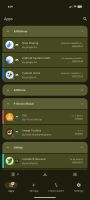
📁 Folders — Create named folders to organise your app list. Apps in a folder are hidden from the main list to keep it decluttered. Folders can auto-assign apps via a rule (match by name, author, package ID, category, or source) or accept manual assignment via long-press. Each folder remembers its own view settings independently.
👆 Configurable swipe gestures — Left and right swipe actions are independently configurable per row. Choose from Update, Install, Pin, Edit, Delete, Open, App Info, or None. A color-coded icon hint appears during the drag so you always know what will happen.
🖼? Custom app icons — Not happy with an app's icon or a blank placeholder? Tap the icon on any app's detail page to set your own — pick from your gallery or grab one from the web.
?? Know the update size beforehand — See the exact download size for every update - across supported stores - before you even hit the update button.
?? Skip Version — Pass on a specific release you don't want without marking the app as "updated." The next release will still show up normally.
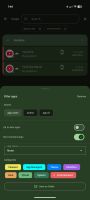
🧩 Advanced filter / RegEx Assist — A built-in helper walks you through building regex filters on any field that supports them. No regex knowledge required. Full details in the Additional options guide.
?? Undo after delete — Swipe-to-delete and bulk-delete both show a 5-second Undo snackbar. Tap it and the app is fully restored.
💾 Save assets - Option to save update assets (e.g. APKs) to your chosen folder, during update process itself.










 bikram-agarwal


No comments or reviews, maybe you want to be first?