NoviSign Digital Signage icon

NoviSign Digital Signage

 1 like

NoviSign is cloud-based digital signage software for creating, scheduling, and managing screen content remotely. It combines Studio AI, a drag-and-drop editor, templates, live data integrations, and support for a wide range of media players and smart displays.
NoviSign Studio AI

Cost / License

  • Subscription
  • Proprietary

Application type

Since

  • Since 2017

Platforms

  • Windows
  • Chrome OS
  • Online
  • Android
1like
0articles
Save

Features

Features

Highlights All activities

NoviSign Digital Signage News & Activities

Recent activities

NoviSign Digital Signage information

  • Developed by

    Unknown
  • Licensing

    Proprietary and Commercial product.
  • Pricing

    Subscription ranging between $14 and $25 per month.
  • Alternatives

    95 alternatives listed
  • Badge

    Get an embeddable badge for NoviSign Digital Signage
  • Supported Languages

    • English
    • French
    • German
    • Greek
    • Russian
    • Portuguese
    • Chinese
    • Dutch
    • Polish
    • Italian
    • Turkish
    • Japanese
    • Spanish
    • Ukrainian
    • Finnish

AlternativeTo Category

System & Hardware
NoviSign Digital Signage was added to AlternativeTo by alicecoooper17 on and this page was last updated .

No comments or reviews, maybe you want to be first?

Official Links

What is NoviSign Digital Signage?

NoviSign is cloud-based digital signage software that helps organizations create, schedule, and manage content across one screen or thousands of displays from a web browser. It supports digital menu boards, employee communications, campus announcements, retail promotions, hotel information screens, interactive kiosks, and more.

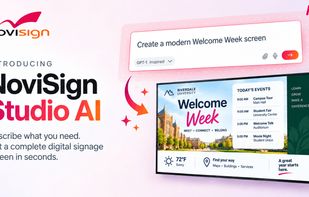
Users can create content with an intuitive drag-and-drop editor, ready-made templates, and customizable widgets. NoviSign Studio AI adds another way to design: describe the screen you want, and it generates a complete layout with text and imagery. Continue refining it through conversational instructions or switch to the regular editor for manual adjustments.

Key features include:

• Content creation: Combine images, videos, slideshows, scrolling text, RSS feeds, weather, clocks, web pages, calendars, and dashboards. • Scheduling and playlists: Choose when and where content appears across individual screens, screen groups, and multiple locations. • Integrations: Connect tools including Amadeus Delphi, Canva, Google Calendar, Google Sheets, Microsoft Outlook, PosterMyWall, Power BI, SharePoint, Tableau, Toast POS, and Zapier. API access supports custom connections. • Remote management: Monitor screen status and player health, manage devices, and access playback reports. • Offline playback: Cached content continues playing when the internet connection drops. • Hardware flexibility: Supports Android, Amazon Signage Stick, BrightSign, ChromeOS, LG webOS, Linux, Samsung Tizen, and Windows. • Team access and security: Manage user permissions, with enterprise security options including SSO and two-factor authentication. • White-label options: Partners and resellers can offer the platform under their own brand.

NoviSign combines accessible content creation with the controls needed to manage larger screen networks. A 30-day free trial is available with no credit card required.

NoviSign Digital Signage Videos