Simple Border icon
Simple Border icon

Simple Border

 Like

Simple Border adds borders to photos without cropping the original composition. Choose a white, black or custom-colored frame, adjust its width, and fit the complete image into the aspect ratio you need. Export at the original resolution for sharing or printing.
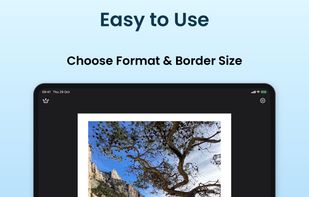
Choose the format and border size on iPad.

Cost / License

  • Freemium (Pay once or Subscription)
  • Proprietary

Since

  • Since 2025

Updated

  • Updated Apr 2026

Platforms

  • Mac  iPad app available on Apple silicon Macs: macOS 15.0 or later and M1 or newer. Apple marks it as not verified for macOS. No Intel support.
  • Android  Photo borders; video and HDR features described in the listing apply to the iPhone and iPad app.
  • iPhone
  • iPad
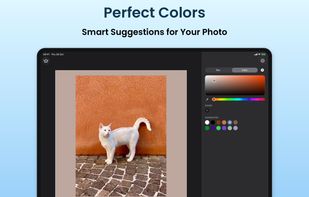
Choose a custom border color with the iPad color picker.
Simple Border screenshot 2
+6
Simple Border screenshot 3
Alternatives
0likes
0alternatives
0articles
Save

Features

Highlights All activities

Simple Border News & Activities

Recent activities

Simple Border information

  • Developed by

    FR flagAndrey Zhukov
  • Licensing

    Proprietary and Freemium product.
  • Pricing

    One time purchase and / or subscription + free version with limited functionality.
  • Alternatives

    0 alternatives listed
  • Badge

    Get an embeddable badge for Simple Border
  • Supported Languages

    • English
    • French
    • Hindi
    • Danish
    • Dutch
    • German
    • Italian
    • Polish
    • Portuguese
    • Spanish
    • Swedish

AlternativeTo Category

Photos & Graphics

Apple AppStore

  •   Updated 
  •   4.67 avg rating
Simple Border was added to AlternativeTo by Andrey Zhukov on and this page was last updated .

No comments or reviews, maybe you want to be first?

Official Links

What is Simple Border?

Simple Border adds borders to photos without cropping the original composition. Choose a white, black or custom-colored frame, adjust its width, and fit the complete image into the aspect ratio you need. Export at the original resolution for sharing or printing.

The app is available for iPhone, iPad and Android. On iPhone and iPad, it also offers video borders, blurred backgrounds, HDR preservation for supported photos and videos, and Shortcuts integration. Optional Premium features include processing up to 10 photos together. The app is free to download with optional paid upgrades, including subscriptions and a lifetime purchase on iOS.