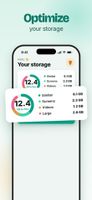
Free up iPhone storage in minutes: Nino finds similar photos, screenshots, short videos and large files, keeps your best shot, and lets you delete the rest in one swipe. Everything happens on your iPhone.
No fake alerts, no inflated numbers. What Nino shows you is what you actually get back.
WHAT NINO CLEANS
• Similar photos and bursts: Nino groups near-identical shots, keeps the sharpest one and pre-ticks the rest. You confirm.
• Screenshots: tickets, codes, memes you forgot about. Sort them in seconds.
• Short videos and heavy files: see what really takes up space, sorted by size.
• Large photos: the ones over 10 MB that quietly fill your storage.
TWO WAYS TO SORT
• Grid: every group on one screen, best photo kept, duplicates already selected.
• Swipe: one photo at a time. Left to delete, right to keep. Fast, and oddly satisfying.
COMPRESS INSTEAD OF DELETING
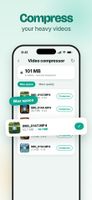
• Video compressor: shrink heavy videos and keep them watchable. Pick "Max space" or "More quality", one video or a whole batch.
• Photo compressor: reduce your heaviest photos without losing them.
• The original goes to the Recently Deleted album for 30 days, so you can always go back.
A PRIVATE VAULT
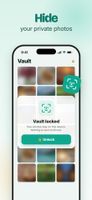
• Move sensitive photos out of your camera roll and iCloud Photos into a vault locked with Face ID.
• Stored only on your iPhone, never uploaded.
NOTHING IS LOST BY ACCIDENT
Deleted photos stay 30 days in Photos › Albums › Recently Deleted. Changed your mind? Restore them in a couple of taps.
YOUR PHOTOS STAY ON YOUR PHONE
Nino analyzes your library on the device. No account, no upload, no cloud processing.
ZERO DARK PATTERNS, PROMISED
• No fake "virus detected", no fake "47 GB to free".
• The price you see is the price you pay.
• Cancel in 2 taps from your Apple settings, no email, no reason needed.
• No full-screen ads that punish you.
FREE TO START
Your first cleanup is free. After that, watch a short ad to unlock another one, or go Pro for unlimited cleaning, the video compressor, the vault and no ads.
Free up space, keep your memories.
Nino Pro is an auto-renewable subscription: yearly (with a 7-day free trial) or weekly. Payment is charged to your Apple Account when you confirm the purchase. The subscription renews automatically unless you cancel at least 24 hours before the end of the current period. Manage or cancel it in Settings › [your name] › Subscriptions.










 Danilo Venom added Nino Cleaner as alternative to CleanMyPhone, Nektony Phone Cleaner, PhotoPanda, iPhone Cleaner and 3 more


No comments or reviews, maybe you want to be first?