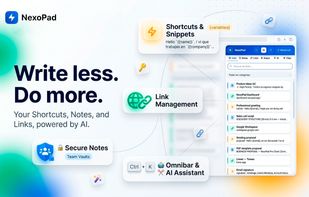
Stop jumping between 20 different tabs. NexoPad is the ultimate productivity workspace for your browser. We've built an "all-in-one" tool that unifies ultra-fast text expansion (snippets), bookmark management, encrypted notes, and an inline Artificial Intelligence assistant (BYOK) in a single place.
NexoPad is designed for anyone who wants to write faster, organize their daily tasks, and keep their most important information just one click away, completely eliminating the need for context-switching.
It adapts to the most demanding workflows. It's the perfect ally for developers needing to inject code snippets, SEOs and marketers automating outreach, and support teams centralizing canned responses.
3 WORKFLOW MODES
Quick Popup: Click the extension to inject text snippets, save links, or take quick notes in 1 second.
Sidepanel: Your persistent assistant. Browse the web while chatting with the AI or drag-and-dropping templates into your emails.
Advanced Notebook: A full-screen editor to create rich templates, organize folders, and manage your B2B team vault.
SMART TEXT EXPANDER & SNIPPETS
Type a short shortcut (e.g., /hello) and NexoPad instantly expands your text fragment anywhere on the web.
Dynamic Forms: Use {{input}} or {{dropdown}} to fill in key data before the text expands.
Live Context Capture: Use {{name}} or {{company}} and NexoPad will read the screen (like a LinkedIn profile) to personalize the message automatically.
Visual Inspector: Extract data from any website by clicking on an element and saving it as a variable for your templates.
Spintax & A/B Variants: Automatically rotate text to test up to 8 versions of the same message.
INLINE AI & CHAT ASSISTANT (BYOK)
Connect your own API Key from top AI providers (OpenAI, Anthropic, Gemini, etc.).
Floating Magic Bubble: Highlight any text on the web and the NexoPad bubble appears. Fix, translate, summarize, or rewrite text directly on the page.
Direct Injection: Replace the original text with the AI's response with a single click, preserving formatting.
Page Analyzer: Summarize the current tab with one click and save your favorite AI prompts.
WEB CLIPPER & SECURE NOTES
Clipper to Markdown: Highlight text, press Alt+C, and NexoPad saves it as a note, keeping the source URL.
Floating Notes: Open notes in independent windows that stay on top of other apps.
BOOKMARK MANAGER
Color-coded Tab Groups: Group multiple URLs and launch them all together in a native browser tab group.
Omnibox Search: Type in your browser's address bar to find and launch your links without opening the extension.
ABSOLUTE PRIVACY
No browsing history collection. No data selling. BYOK (Bring Your Own Key) model: your AI keys travel directly from your browser to the provider, never passing through our servers.






 Rych added NexoPad as alternative to Notion Web Clipper
 Rych added NexoPad as alternative to AutoHotkey, espanso, PhraseExpress, FastKeys and 51 more

 Individual

No comments or reviews, maybe you want to be first?