NetSetMan icon
NetSetMan icon

NetSetMan

 48 likes

Manage and switch between 6 tailored network profiles on Windows, instantly adjusting IP, DNS, gateway, WINS, computer name, workgroup, printer, network drives, NIC status, scripts, and hosts file settings, with multilingual support for mobile users.
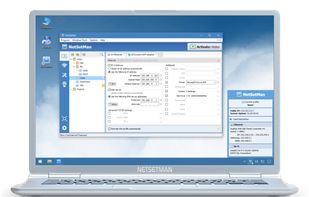
NetSetMan screenshot 1

Cost / License

  • Free Personal
  • Proprietary

Platforms

  • Windows
48likes
0articles
Save

Features

Highlights All activities

NetSetMan News & Activities

Recent News

No news, maybe you know any news worth sharing?

Share a News Tip

Recent activities

NetSetMan information

  • Developed by

    DE flagIlja Herlein
  • Licensing

    Proprietary and Free Personal product.
  • Alternatives

    20 alternatives listed
  • Badge

    Get an embeddable badge for NetSetMan
  • Supported Languages

    • English
    • Chinese
    • Bulgarian
    • Croatian
    • Czech
    • Dutch
    • French
    • German
    • Hungarian
    • Italian
    • Japanese
    • Korean
    • Polish
    • Portuguese
    • Serbian
    • Russian
    • Slovene
    • Spanish

AlternativeTo Categories

Network & Admin, OS & Utilities

Our users have written 2 comments and reviews about NetSetMan, and it has gotten 48 likes

NetSetMan was added to AlternativeTo by em4020 on and this page was last updated .

Comments and Reviews

   
jastorgamuoz
0

The best alternative

jorgeenriqueroman
1

Its the best config profile switcher.

Official Links

Install from the command line

  • winget install -e --id NetSetMan.NetSetMan

Be careful what you paste into a terminal. Check what a command installs before running it.

What is NetSetMan?

Are you tired of changing your network configuration on your laptop every day? Always the same procedure? At home: changing...In the office: changing...

Then NetSetMan is your solution in 21 languages. It will do the work for you. NetSetMan is a network settings manager which can easily switch between 6 different, visually structured profiles including: IP Address, Subnet Mask, Default Gateway, DNS Server, WINS Server, Computer Name, Workgroup, DNS Domain, Default Printer, Network Drives, NIC Status, SMTP Server, Hosts File Entries, Scripts (BAT, VS, JS, ...).

