MyDesktopWidget is described as 'A modern Windows desktop widget engine with zero-wake gaming pause, wallpaper-layer rendering, and an experimental Rainmeter skin importer' and is a desktop customization tool in the os & utilities category. There are more than 25 alternatives to MyDesktopWidget for a variety of platforms, including Windows, Linux, Mac, Wayland and Android apps. The best MyDesktopWidget alternative is Rainmeter, which is both free and Open Source. Other great apps like MyDesktopWidget are Seelen UI, Libre Hardware Monitor, Wigify and Sidebar Diagnostics.


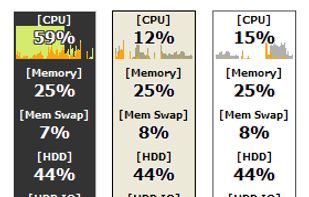
Lets you keep your eye on system resource usages of your PC. It supports 43 kinds of information including CPU, Memory, Network, and detailed HDD usages, so you may discover what's limiting your system performance in each occasion.

GKrellM is a single process stack of system monitors which supports applying themes to match its appearance to your window manager, Gtk, or any other theme.


macOS and OSX tool showing real-time CPU, memory, network activity, fan speed, and temperature in the menu bar. Highly configurable, with customizable battery notifications, support for light or dark mode, open-source code, and ongoing community-driven updates.

This program is a GTK3-based wrapper to display a script output, or a text file content on the desktop in sway or other wlroots-based compositors. It uses the gtk-layer-shell library to place the window on the bottom layer.


Nerdtool allows you to display many things directly on top of your desktop; weather reports, headline news, and system vitals are just a few uses.


WPInfo displays system information on the Windows wallpaper. It works similarly to BGInfo from SysInternals but it adds a few unique features:

Create you own designs and display any data you need, at once, and with wonderful animations too! If you were looking for Rainmeter or Conky on Android, this is it!


MiniUsage displays various data like CPU usage, amount of network flow, battery status and process names which uses much CPU time in a menubar. It takes little space and can display various data, so it's suitable for notebook.


Visualizes live CPU, memory, network, disk, battery, and wireless usage on macOS using a compact, customizable interface, blending data graphically and textually on desktop, menu bar, or Dock, with Retina support, hotkeys, and minimal system impact.


WinBar is a free and compact program that lets you monitor your system and provides easy access to frequently used controls. WinBar will run on Windows 2000 and newer operating systems and is available in 32 and 64 bit flavors.