

Mosaic Collage Maker icon

Mosaic Collage Maker

Automatically lays out folders of photos into print-ready collage pages for photobooks, or printers at any page size in millimetres. No fixed grids. No manual selection.
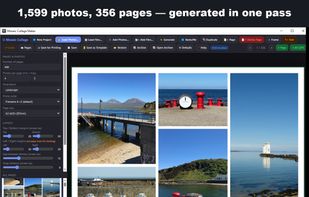
Create multiple pages in seconds

Cost / License

  • Pay once
  • Proprietary

Platforms

  • Windows
  • Mac
0likes
0comments
0articles

Features

Mosaic Collage Maker News & Activities

Highlights All activities

Recent activities

Mosaic Collage Maker information

  • Developed by

    stevendevmosaic
  • Licensing

    Proprietary and Commercial product.
  • Pricing

    One time purchase (perpetual license) that costs $10.
  • Alternatives

    35 alternatives listed
  • Supported Languages

    • English

AlternativeTo Category

Photos & Graphics
Mosaic Collage Maker was added to AlternativeTo by stevendevmosaic on and this page was last updated .
No comments or reviews, maybe you want to be first?

What is Mosaic Collage Maker?

Mosaic Collage Maker turns a folder of photos into print-ready collage pages for a photobook. Point it at a folder, choose the page size your photobook service asks for, and it builds a mosaic layout for every page — using all your photos, spread across as many pages as it takes. There is no fixed grid. Each page is built by repeatedly dividing the page, so frames come out in genuinely different sizes and proportions and no two pages look alike. Your photos are not poured into a repeating 2x2 or 3x3 template. If a page is not right, Reshuffle rebuilds just that one, leaving the rest of the book untouched. Everything stays editable: move and resize frames, swap photos, zoom and reposition each picture, add captions and backgrounds. Frames and text can be pinned so they stay fixed while everything else rearranges around them. Margins, gaps and borders are real physical measurements — a 20 mm margin is 20 mm on the printed page whatever your screen size — so a book assembled over several sittings stays consistent throughout. Pages export as 300 DPI JPEGs, individually or as a ZIP, ready to upload to a photobook service or printer. Custom page sizes save as named presets, and a page design can be saved as a template and reused across books with different photos. Works entirely offline — no account, no subscription, no network access.

Official Links