Mnemosyne OS icon
Mnemosyne OS icon

Mnemosyne OS

A control room for AI memory. Your files and conversations become searchable memory any model you connect can draw on, and you decide what enters, what moves and what leaves. Vaults live on your hardware.
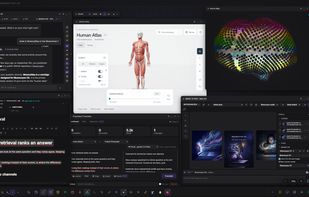
Your own memory, recalled with its reasons

Cost / License

  • Freemium (Pay once)
  • Proprietary

Platforms

  • Mac  Not signed or notarized yet (Apple Developer enrollment under way). Gatekeeper blocks the first launch: right-click the app, choose Open, then confirm. Until the certificate is in place, each new version has to be downloaded manually instead of updating in place.
  • Windows  NSIS installer, or a portable .exe that runs from a USB drive with no installation. The Windows build is code-signed with a Certum certificate.
  • Linux  Shipped as an AppImage: mark it executable and run it, no installation and no package manager needed.
3likes
0articles

Features

Properties

  1.  Lightweight
  2.  Support for Themes
  3.  Privacy focused
  4.  Distraction-free
  5.  Local-First
  6.  AI-Powered

Features

  1.  Support for MarkDown
  2.  Live Preview
  3.  Ad-free
  4.  Reminders
  5.  No Coding Required
  6. LaTeX icon  Support for LaTeX
  7.  Extensible by Plugins/Extensions
  8.  Web Clipper
  9.  Portable
  10.  No Tracking
  11.  WYSIWYG Support
  12.  Hierarchical Structure
  13.  Recurring Tasks
  14.  Full-Text Search
  15.  No registration required
  16.  Works Offline
  17.  Dark Mode
  18.  Goal Tracking
  19.  Built-in viewer
  20.  Offline
  21.  Semantic Search
  22.  Knowledge Management

Mnemosyne OS News & Activities

Highlights All activities

Recent activities

  • bnchndlr liked Mnemosyne OS
  • YAKA reviewed Mnemosyne OS  

    I am the developer of Mnemosyne OS, so read this as a maker's note.

    What I use it for every day: it keeps track of all my projects, it keeps an eye on my codebase, and it makes me more curious, because everything I read, it remembers, so I can ask for it later instead of losing it.

  • YAKA updated Mnemosyne OS
  • Milesde A comment was removed from Mnemosyne OS
  • YAKA updated Mnemosyne OS
  • Milesde liked Mnemosyne OS
  • YAKA liked Mnemosyne OS
  • YAKA added Mnemosyne OS
  • YAKA updated Mnemosyne OS
  • YAKA updated Mnemosyne OS

Mnemosyne OS information

  • Developed by

    US flagMnemosyne OS
  • Licensing

    Proprietary and Freemium product.
  • Pricing

    One time purchase (perpetual license) that costs $70 + free version with limited functionality.
  • Alternatives

    5 alternatives listed
  • Badge

    Get an embeddable badge for Mnemosyne OS
  • Supported Languages

    • English
    • French
    • Spanish
    • German
    • Portuguese
    • Russian
    • Chinese

AlternativeTo Category

Office & Productivity

Popular alternatives

View all

Our users have written 1 comments and reviews about Mnemosyne OS, and it has gotten 3 likes

Mnemosyne OS was added to AlternativeTo by Tony Trochet on and this page was last updated .

Comments and Reviews

   
Tony Trochet
0

I am the developer of Mnemosyne OS, so read this as a maker's note.

What I use it for every day: it keeps track of all my projects, it keeps an eye on my codebase, and it makes me more curious, because everything I read, it remembers, so I can ask for it later instead of losing it.

Official Links

What is Mnemosyne OS?

Mnemosyne OS is a desktop operating system for memory. Not a chatbot that happens to remember: memory is the primitive, and AI is one of several ways to question it.

YOUR MEMORY, ON YOUR DISK Point it at folders you already have. It watches them and turns documents, notes, PDFs, images, captured web pages and your agents' own transcripts into searchable memory, stored in vaults on your own drive, one per area of life: code, research, journal, work. Each vault carries its own protection level, and two vaults never mix unless you say so. Retrieval is hybrid, semantic plus lexical, and runs on your machine, so search still answers with the cable unplugged.

ANY MODEL, OR NONE Bring your own key (Anthropic, OpenAI, Google, Mistral), point it at your own server, or run a local model. Embeddings and ranking stay local either way.

A CONTROL ROOM FOR YOUR AGENTS This is where it stops being a note app. An MCP server ships with it, so Claude Desktop, Claude Code and any MCP client draw on the same memory instead of starting from zero every session. A bridge connects VS Code and Cursor. Connectors read what your coding agents already write to disk, so you can see every session running on your machine, what files each one actually touched, and get warned when two agents are working in the same git tree. Agents publish status cards you pin on the canvas and answer from there. A loopback endpoint can even serve your own inference to a local agent.

AN ECOSYSTEM, NOT A FEATURE LIST The interface is a spatial canvas rather than a stack of tabs, spread across several desktops. On it live chat, vaults, notes, a neural map of your own memory, a to-do, an agenda, an image studio, a PDF reader, a capture browser, a conversation recorder, and voice in and out. MnemoHub adds third-party cartridges: real apps with their own declared permissions. An SDK lets you build your own.

Free to use, with a one-time $70 licence (perpetual, no subscription) that unlocks local neural voices, heavy local OCR, and premium MnemoHub cartridges. Windows, macOS and Linux. The MCP server, the SDK and the cartridge SDK are published on npm under the MIT licence.