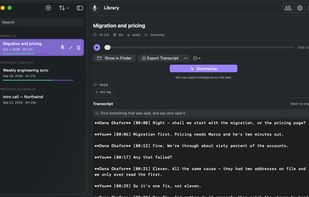
Minutiva Private records your meetings, transcribes them and writes up the decisions and action items — and does all of it on your Mac. There is no server to sign up to, no bot that joins your call to announce it is recording, and no copy of your conversation on anyone else's hardware.
It captures both sides. Your microphone picks up the room; macOS audio capture picks up whoever is on the other end of Zoom, Meet, Teams or a phone call, so a remote meeting comes out as one transcript rather than half of one.
It works out who said what. Voices are separated automatically, and once you put a name to one, Minutiva remembers it — the same person is recognised in next week's meeting without being introduced again. Names, merges and corrections apply across your whole library, not one meeting at a time.
Summaries are yours to choose. On a Mac that supports Apple Intelligence, a meeting can be summarised entirely on-device at no cost and with nothing sent anywhere. If you would rather use something else, connect your own provider — a local model through Ollama or LM Studio, or an API key you already pay for. Minutiva has no AI service of its own to sell you.
Other things it does:
• Transcribes offline using Whisper models you download once — useful on a plane, and unaffected by anyone else's outage
• Keeps the audio, with retention settings you control, so a meeting can be re-read or re-analysed later rather than being gone
• Syncs between your own Macs through your own iCloud account, which means Apple holds it and we never do
• Exports to Markdown, plain text and PDF
• English and Spanish interface
There is a free tier that is genuinely usable, and a paid one for people who want more. Minutiva Go, a companion app for iPhone, iPad and Apple Watch, is listed separately.
Distributed directly rather than through the Mac App Store: capturing system audio requires an entitlement the App Store does not permit. The download is signed and notarised by Apple.







 SoDulceLabs added Minutiva Private as alternative to Otter.ai, Granola, Thoth, Biscotti and 12 more


No comments or reviews, maybe you want to be first?