MicKeeper icon
MicKeeper icon

MicKeeper

When AirPods or other Bluetooth headphones connect to a Mac, macOS makes them the microphone too. As soon as an app uses that microphone (a call, a Meet tab, dictation), the headphones switch to call mode and everything you hear turns mono and muffled.
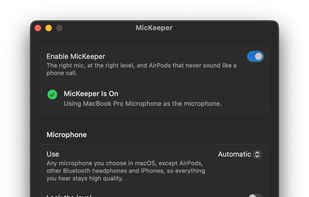
The settings window

Cost / License

  • Free
  • Open Source (MIT)

Platforms

  • Mac  Requires Apple silicon and macOS 13 or later.
0likes
0articles
Save

Features

No features, maybe you want to suggest one?

Highlights All activities

MicKeeper News & Activities

Recent activities

MicKeeper information

GitHub repository

  •  0 Stars
  •  0 Forks
  •  0 Open Issues
  •   Updated  
View on GitHub

Popular alternatives

View all
MicKeeper was added to AlternativeTo by Frat Ayaydn on and this page was last updated .

No comments or reviews, maybe you want to be first?

Official Links

What is MicKeeper?

When AirPods or other Bluetooth headphones connect to a Mac, macOS makes them the microphone too. As soon as an app uses that microphone (a call, a Meet tab, dictation), the headphones switch to call mode and everything you hear turns mono and muffled. With an iPhone nearby, macOS may switch to its microphone instead. And apps like Zoom, Teams and Chrome change your microphone level on their own. MicKeeper switches the microphone back and, if you want, puts the level back too. . You can also pick one microphone in the list, and MicKeeper uses it whenever it is connected. That is also how to use AirPods or an iPhone as the microphone on purpose.

The background agent uses about 3 MB of memory, doesn't poll and needs no permissions. There is no menu bar icon