Merchgain is a free WooCommerce profit report. WooCommerce tells you what you sold. It does not tell you what you earned.
Since WooCommerce 10.3 the cost of goods sold is a field in the core product editor, and every order records the cost at the moment of sale. Merchgain reads that field and answers the question the sales report cannot: how much of this revenue is actually yours. No import, no second place to keep costs, no account.
It only reads. No product, no price, no order and no cost value is ever written back to the store.
What you get:
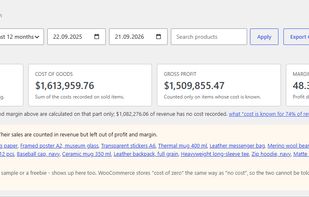
Summary cards - revenue, cost of goods, gross profit and margin for the period you pick.
Profit per product - sortable, searchable, paginated, with the number of items sold.
Profit per category - the same sales grouped by product category.
CSV export of whatever the report is currently showing.
What it does honestly, and what that rules out:
Coverage is stated, not hidden. Every figure comes with the share of revenue whose cost is actually known. A store that filled in costs for a third of its catalogue is told exactly that, instead of being handed a confident margin calculated from a third of the data.
Products with no cost recorded are listed by name, with links straight to them. A product priced at zero on purpose shows up there too, because WooCommerce stores "cost of zero" the same way as "no cost" and the two cannot be told apart.
Costs kept by another plugin are recognised and named, so the screen does not claim a product has no cost when it has one somewhere else. Recognised: Cost of Goods for WooCommerce, ATUM Inventory Management, NI WooCommerce Cost of Goods, and Cost of Goods.
A product that sits in several categories is counted in each of them, so category totals can add up to more than the summary. The screen says so instead of quietly rounding the difference away.
Currencies are never converted. Orders in another currency are left out of the report and listed by code, because adding them into one total without an exchange rate produces a number that looks right and is not.
This is gross margin from recorded cost of goods. It is not net profit: advertising spend, shipping, payment fees and returns are not part of it. Tools that calculate net profit do it by connecting to ad platforms and payment providers; Merchgain connects to nothing at all and runs entirely on the server the shop already pays for.
Requires WooCommerce 10.3 or newer with the Cost of Goods Sold feature switched on. The interface is available in English and Polish.







 Baltano-9186 added Merchgain as alternative to TrueProfit, Bloom Analytics and Putler

