Meetings don't wait for you to catch up.
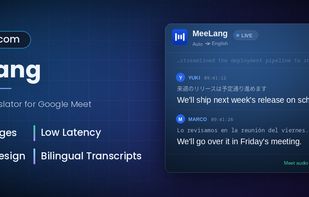
MeeLang is a real-time AI-powered translator for Google Meet. It translates what everyone says into your own language and puts it on screen as live subtitles — while the sentence is still being spoken. Stop guessing, stop asking people to repeat themselves, and just follow the conversation.
WHO IT'S FOR:
• Remote teams working across countries and time zones.
• Anyone joining a video call held in a language they're still learning.
• Interviews, onboarding, sales calls, and customer support across a language barrier.
• Students and researchers in international online meetings.
HOW IT WORKS:
- Install MeeLang and open any Google Meet call.
- Choose the language you want to read.
- Translated subtitles appear on screen as people speak.
No bot to invite, no meeting link to paste, no calendar to connect, nothing to switch on. It works the moment the call starts.
WHY MEELANG:
• Real-time translation. Translated captions arrive while the sentence is still being said — not in a summary you read after the meeting.
• No bot joins your call. Other participants see nothing: no extra "recorder" in the participant list, no announcement, no interruption.
• Your language, your screen. Everyone on the call can read live subtitles in a different language at the same time.
• Meeting content is kept on your device — nothing is lost when the call ends.
• Export any meeting content with original and translation together.
• AI summary for your meeting content.
• Zero setup. No accounts to link, no admin approval, no IT ticket.
YOUR MEETING MANAGER:
Every translated meeting is kept on your device, so the conversation is still there after everyone hangs up. Open MeeLang to:
• Review, search by keyword, filter by speaker or platform, and delete your meeting records anytime.
• Rename a meeting and write your own summary, so it's easy to find months later.
• Export meeting records as you want, original and translation together.
LANGUAGES:
Translate Google Meet into English, Chinese, Japanese, Korean, French…30+ languages supported.
PRIVACY:
The words spoken in your meeting are never stored on our servers. A line is sent to us only to be translated and isn't kept afterwards — we hold on to usage data like how many characters were translated, so your daily free minutes can be counted.








 Adujkl added MeeLang as alternative to Handy STT, Vibe Transcribe, Voxtral, FUTO Voice Input and 47 more

No comments or reviews, maybe you want to be first?