
MediaFlowSwift icon
MediaFlowSwift icon

MediaFlowSwift

 1 like

Mac footage manager for video creators: import, review, organize and archive, and free up space only once each copy is proved to match.
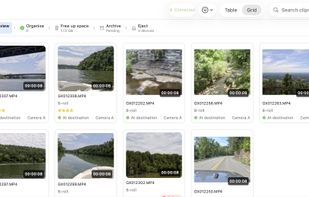
A project in Review: clips with ratings, categories and where each copy is, plus the step strip across the top.

Cost / License

  • Subscription
  • Proprietary

Application type

Since

  • New

Platforms

  • Mac  Apple silicon Macs, macOS 13 or later
1like
0articles
Save

Features

Properties

Features

Highlights All activities

MediaFlowSwift News & Activities

Recent activities

MediaFlowSwift information

AlternativeTo Category

File Management

Popular alternatives

View all
MediaFlowSwift was added to AlternativeTo by longroadsoftware on and this page was last updated .

No comments or reviews, maybe you want to be first?

Official Links

What is MediaFlowSwift?

MediaFlowSwift keeps track of the footage from a shoot, from the card to the archive. It imports from SD cards, USB drives, folders, iPhone and cameras over USB; sorts, rates and reviews clips with a frame-accurate preview; copies everything into a tidy folder structure at the project's destination, ready for editing; frees up space only once each copy is proved; and archives to numbered drives with a record of what is where.

A strip under the toolbar follows the steps of a shoot and always offers the one next action, so a half-finished project tells you what it still needs.

Whenever a copy is followed by a removal, the copy is checked against the original first. If it does not match, nothing is removed.

Also: proxies for footage on a network share, an editing-drive round trip to a fast SSD and back, one command to point every project at a moved library, a shared project database, and PDF, HTML and CSV reports. The Studio Pro plan drafts a video's title, description, chapters and tags, and runs a database server for several Macs at once.

No account and no usage data. Projects are plain files in folders you choose. Every outside service is off until you turn it on.

macOS 13 or later, on a Mac with Apple silicon. 14-day trial of the full app, no card needed.