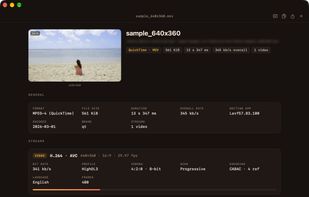
Media Spy is a free media file inspector for macOS. Open a video, audio or image file and it shows how the file is built: a short summary at the top, then a card for each video, audio and subtitle track.
Video: codec, resolution, aspect ratio, frame rate, profile, colour format, bit depth and HDR (HDR10, Dolby Vision), with a preview frame.
Audio: codec (including Dolby Atmos), channels, sample rate and bit depth, plus a waveform of the whole track and peak meters for each channel.
Subtitles: language and format of each track, marked Default or Forced.
Images: resolution, bit depth and colour space for JPEG, PNG, HEIC, JPEG XL and more.
When you need everything, switch to the full list of fields and search it with ⌘L.
It fits into Finder: right-click a file and choose Services ▸ Get Media Info or Open With ▸ Media Spy, or press Space for Quick Look. Quick Look works even for MKV and other formats macOS can't preview on its own. Drop in several files at once and switch between them in the sidebar.
Copy the full report with ⇧⌘C, or export it as Text, HTML, JSON or XML.
Media Spy reads files and never plays them, so even large files open in a moment. It uses MediaInfoLib from MediaArea, the engine behind MediaInfo, so the results match MediaInfo.
Supported formats include MKV, MP4, MOV, AVI, MPEG-TS, WebM, MP3, AAC/M4A, FLAC, WAV, AIFF, JPEG, PNG, HEIC, JPEG XL and GIF.
Requires macOS 14 Sonoma or later on a Mac with Apple silicon. Signed and notarized by Apple. No account, no ads, no tracking.







 halebop added Media Spy as alternative to Media Info+, Media Info Viewer, MediaInfo Lite and MediaInfoXP

 Monokern


No comments or reviews, maybe you want to be first?