Maxer Monitor icon
Maxer Monitor icon

Maxer Monitor

See your PC's temperatures and fan speeds on top of your game without leaving it. Opens with Win+G and shows the sensors you pick, at the size and transparency you want.
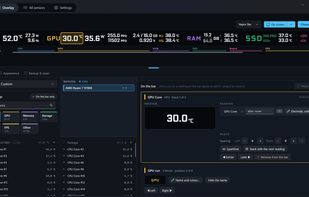
Maxer Monitor screenshot 1

Cost / License

  • Free
  • Proprietary

Platforms

  • Windows
2likes
0articles
Save

Features

  1.  Portable
  2.  Works Offline
  3.  No registration required
  4.  No Tracking
  5.  Dark Mode
  6.  Ad-free
  7.  In-Game Overlay
  8.  FPS counter
  9.  Hardware Monitoring

Maxer Monitor News & Activities

Highlights All activities

Recent activities

Maxer Monitor information

Our users have written 1 comments and reviews about Maxer Monitor, and it has gotten 2 likes

Maxer Monitor was added to AlternativeTo by Roberto-Batty on and this page was last updated .

Comments and Reviews

   
Top Positive Comment
belu4342
0

Loving it! The modern hwinfo with a gaming overlay. Surprisingly good for an alpha release

What is Maxer Monitor?

IMPORTANT: this widget needs the Maxer Monitor app installed on the same PC. That app is what reads the sensors; the widget only displays them. Without it, the widget opens and tells you it cannot find any readings. The app is free and available in the Store.

The moment a game goes full screen, your temperatures stop existing. You alt-tab out, look, go back in, and by then the machine has cooled down anyway.

This widget puts the readings on top of the game. Win+G and there they are: CPU and GPU temperature, fans, clock rates, memory — whatever you chose to show.

WHAT IT DOES

• Lives inside Xbox Game Bar, on Win+G, without leaving the game • Pins in place so it stays on screen while you play • Shows the sensors you pick, in the order you want • Adjustable transparency, so it reads over the game without hiding it • Adjustable text size, up to double • Compact mode: label and value only, for Windows handhelds • Resizes freely, from a single row to a full panel

IT CONNECTS TO NOTHING

The widget is declared with no capabilities at all: no internet access, no file system access, no elevated permissions. That is not a promise from us — Windows enforces it. It receives readings from the desktop app over a local channel that never leaves the machine, and it transmits nothing anywhere.

IT SHARES WHAT YOU ALREADY CHOSE

The sensors you selected in the desktop app show up here. Choose once and it applies to both surfaces, rather than configuring the same thing twice.

REQUIREMENTS

• Windows 10 version 2004 or later, 64-bit • Xbox Game Bar installed (it ships with Windows) • The Maxer Monitor app installed and running on the same PC

Maxer Monitor Videos

Show 2 more videos