
MangoDisk icon
MangoDisk icon

MangoDisk

MangoDisk helps you reclaim disk space without digging through hidden folders. Deep Cleanup finds caches and temporary files, nested treemaps and a sunburst chart show where storage is going, and the duplicate finder groups identical copies.
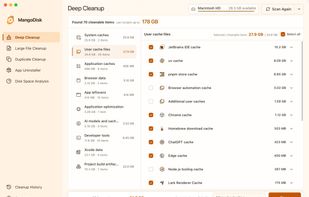
Deep Cleanup scans system caches, developer caches, project build artifacts, and app leftovers for review before cleaning.

Cost / License

Application type

Platforms

  • Mac
  • Windows
  • Linux  Linux packages are available for x64 and ARM64 as .deb and AppImage. Ubuntu 22.04 or later is recommended; compatibility depends on the distribution and system libraries. Version 1.1.5 fixes the earlier AppImage launch-permission issue.
1like
0articles
Save

Features

Properties

  1.  Privacy focused

Features

  1.  No registration required
  2.  Dark Mode
  3.  Ad-free
  4.  Command line interface
  5.  Delete Temporary Files
  6.  Works Offline
  7.  Software Uninstallers
  8.  Duplicate File Finder

MangoDisk News & Activities

Highlights All activities

Recent activities

MangoDisk information

AlternativeTo Categories

OS & Utilities, File Management, System & Hardware

GitHub repository

  •  3,644 Stars
  •  262 Forks
  •  7 Open Issues
  •   Updated  
View on GitHub
MangoDisk was added to AlternativeTo by Harry on and this page was last updated .

No comments or reviews, maybe you want to be first?

Official Links

What is MangoDisk?

MangoDisk helps you reclaim disk space without digging through hidden folders. Deep Cleanup finds caches and temporary files, nested treemaps and a sunburst chart show where storage is going, and the duplicate finder groups identical copies. App Uninstaller lets you review related files alongside the apps you remove.

Privacy Cleanup brings supported browser, app and system activity into one place. Choose a time range, review the records and decide what to clear. Clearing cookies can sign you out of websites.

Startup management, system optimization and maintenance tools help reduce unwanted background activity and address common system problems. Operation History keeps a record of cleanup and system changes. Feature availability varies by operating system.

Optional AI explanations help you understand unfamiliar cleanup items, startup entries, large files, duplicates and apps before making changes. Official releases include a free daily allowance, or you can connect your own AI service; provider charges may apply. Online AI services receive details about the selected item, such as its name, path and status, but not file contents. AI does not delete files or change settings for you.

Disk scans and cleanup run locally and do not require an account. Scanning alone does not delete anything. Developed by Harry; the desktop app is free and open source under GPL-3.0.