


Mailspring
118 likes
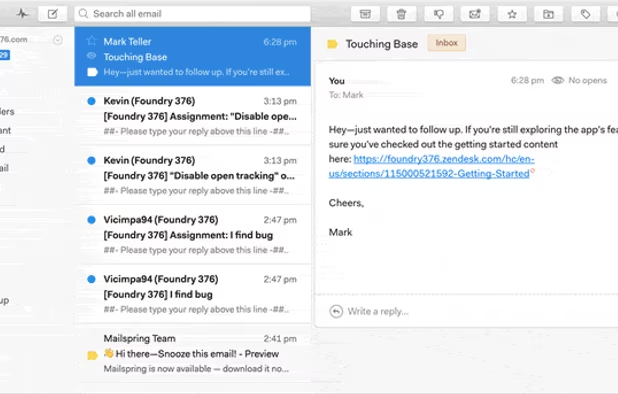
Boost your productivity and send better email with Mailspring, a beautiful, fast email client for Mac, Windows, and Linux. Mailspring is free to use and an optional pro version adds read receipts, send later, reminders and more.
Cost / License
- Freemium (Subscription)
- Open Source (GPL-3.0)
Application type
Platforms
- Mac
- Windows
- Linux
- Arch Linux
- Fedora
- Ubuntu

Features
Highlights All activities
Mailspring News & Activities
Recent News
- Paul published news article about Mailspring

Recent activities
 EasymailApp added Mailspring as alternative to Easymail
 Paul added Mailspring as alternative to Penguin Mail
 nihilagarwal added Mailspring as alternative to Faraday.email
 Korbs added Mailspring as alternative to Convey-Mail
 c17s5qhu added Mailspring as alternative to Meron
 Canary Mail added Mailspring as alternative to Dove
 flectar added Mailspring as alternative to Flectar Mail
It's an Electron app, meaning that you're running a website in a browser rather than a native app.
 Korbs added Mailspring as alternative to Hylki
 Ertan-Yuce added Mailspring as alternative to MailCode





Crew Picks
Our favorite apps


DeMicrosoft Your Life
How are you?
In this list I bring you a variety of alternative software to those from Microsoft, and also that these free and open source programs
So enjoy this list!
(I will be updating it every day)


The software I'll install on my laptop once I ditch macOS for Linux
Spoiler: I've switched to Linux for my main computer, and here's what I'm currently using.
Official Links
Install from the command line
winget install -e --id Foundry376.Mailspringbrew install --cask mailspringflatpak install flathub com.getmailspring.Mailspring
Developed by
 Foundry 376
 Licensing
Open Source (GPL-3.0) and Freemium product.Pricing
Subscription that costs $8 per month + free version with limited functionality.Written in
Rating
Average rating of 3.1Alternatives
58 alternatives listedBadge
Get an embeddable badge for MailspringSupported Languages

AlternativeTo Categories
Office & Productivity, OS & Utilities, Social & CommunicationsGitHub repository
- 17,921 Stars
- 1,056 Forks
- 21 Open Issues
- Updated


Comments and Reviews
I love the features but not the price. The swipe functions are smooth; the snooze later works great.
NEW, though, is a limit of opening only 5 emails per week? Don't update if you have an older version. I cannot afford $8 a month, so I will have to switch programs.
There are a lot of really neat things about this mail client. I was briefly very excited by it. But it's a dead product with deal-breaking bugs.
It's a poorly optimized web-app (Electron) that takes up a lot of disk space and burns through battery on a laptop. Often needs to be closed and re-opened to restore responsiveness. Typing long messages in particular make is churn down to several seconds between visual updates.
It doesn't integrate with any address book of any kind.
The composer is very basic - think boilerplate WYSIWYG. No image resizing. No tables. I could go on.
It's a paid product making a sustainable amount of revenue (unless there are really only a handful of subscribers), showing that the maintainer is negligent or unskilled to the extent that it's unreasonable to think that these problems will be fixed within even the next half decade.
[Edited by M_Pixel, June 20]
Speaking as the new Volunteer Community Manager, the project is NOT abandoned.
Development temporarily halted due to 2020 being what it was, but it has resumed. 1.8.0 just released this week, and another release is planned for the next couple of weeks.
Also, the revenue is not as high as you might think. The costs of providing some of the premium features is substantial. The maintainer is far from negligent or unskilled, but he also has limited time, as he has a full time job besides this. Open source contributions enable Mailspring to move forward.
Well, we're 2 years into my estimated "next half decade" and people are still experiencing these issues. It doesn't give me any confidence to hear that the maintainer is spending so much on "some of the premium features" while basic fundamental functionality and stability languishes.
This issue is still apparent in July 2021. So many of their users are now switching back to the email client they came from. The software is riddled with bugs making it unusable, and many of us have paid for it. If open source contributions are needed to move this software forward then the core developer should be focusing on this instead of just hoping that people will come forward. Many of it's users, including the agency I am from, have no knowledge of working with Electron - surely they must have a community somewhere to try and bring developers into this project...(?)
It's an Electron app, meaning that you're running a website in a browser rather than a native app.
I installed Mailspring and I liked it. BUT, it lacks of some necessary facilities to make our life easier. For instance, links and shortcut to Contacts. Is it so difficult to include such piece of code?
Mailspring is a very modern, attractive, responsive cross-platform open-source (private) email app with a lot of great features. Unfortunately there are still several key features missing vs. its more established alternatives, such as independent contact and calendar sync by way of CardDav/CalDav, etc. Very promising app, but still lagging behind in development of key features.
It's not native, the framework is too heavy on resources even on a high level machine. Interface is good, but doesn't mean much when it's not usable.
It is stated as "Email Client", but it is not true. This is a cloud service. It does not work when the mail server is running, but without access to their cloud. I got the message "Could not reach id.getmailspring..." during installation. Unable to complete installation as well as offline installation.