MagicPhone icon
MagicPhone icon

MagicPhone

MagicPhone is an open-source Android automation assistant. Describe what you want to do by typing or using Android voice input, and it can open apps, read permitted screen content, tap, scroll and enter text through Android Accessibility.
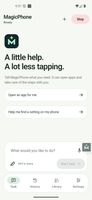
MagicPhone task composer with text and Android voice input
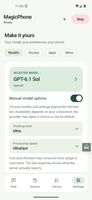
Model, thinking level and speed settings
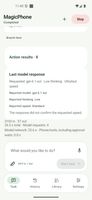
Task response with the option to read it aloud

Cost / License

  • Free
  • Open Source (MIT)

Platforms

  • Android  Android 11 or newer. Requires Accessibility permission and a supported model-provider account or API configuration. No root required.
0likes
0articles
Save

Features

Properties

  1.  AI-Powered

Features

  1.  No Coding Required
  2.  Ad-free
  3.  Task Automation

MagicPhone News & Activities

Highlights All activities

Recent activities

MagicPhone information

AlternativeTo Categories

Office & Productivity, AI Tools & Services

GitHub repository

  •  1 Stars
  •  0 Forks
  •  0 Open Issues
  •   Updated  
View on GitHub
MagicPhone was added to AlternativeTo by magicphoneorg on and this page was last updated .

No comments or reviews, maybe you want to be first?

Official Links

What is MagicPhone?

MagicPhone is an open-source Android automation assistant. Describe what you want to do by typing or using Android voice input, and it can open apps, read permitted screen content, tap, scroll and enter text through Android Accessibility.
Use the Accessibility shortcut to ask about the screen you already have open. A small progress bubble keeps you informed; replies and questions return to the same conversation. Chats retain submitted photos for follow-up questions, and responses have an optional Read aloud button.

Connect an eligible ChatGPT account or configure an API-compatible model provider. Model, thinking and speed options depend on your provider and account. Cloud providers receive the task and permitted screen context needed for the request; this is not an offline assistant.

Choose app access and approval settings, block apps, and pause or stop a task. The app contains no ads or developer analytics. The source is available under MIT or Apache-2.0.

Early access for Android 11 and newer, with English and Greek interfaces. No root or computer is needed for everyday use. App compatibility varies, AI can make mistakes, and you should supervise consequential actions. The app is free; model-provider charges and usage limits may apply. Independent project, not affiliated with OpenAI or Google.