
MacroWin icon
MacroWin icon

MacroWin

 Like

MacroWin turns the things you do over and over on Windows into one key press. You pick what starts a macro, such as a hotkey, a mouse button, a typed shortcut, a schedule, a USB drive or your voice. Then you pick what it does, such as pressing keys, typing, clicking, opening...
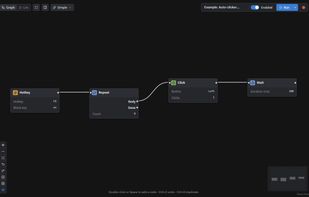
A macro in the Graph view: F8 starts and stops an auto-clicker

Cost / License

  • Freemium (Pay once or Subscription)
  • Proprietary

Application type

Since

  • New

Platforms

  • Windows  Windows 10 and 11
0likes
0articles
Save

Features

Features

Highlights All activities

MacroWin News & Activities

Recent activities

MacroWin information

  • Developed by

    WaveBit
  • Licensing

    Proprietary and Freemium product.
  • Pricing

    One time purchase that costs $39, and / or subscription that costs $6 per month + free version with limited functionality.
  • Alternatives

    18 alternatives listed
  • Badge

    Get an embeddable badge for MacroWin
  • Supported Languages

    • English

AlternativeTo Category

Office & Productivity
MacroWin was added to AlternativeTo by WaveBit on and this page was last updated .

No comments or reviews, maybe you want to be first?

Official Links

What is MacroWin?

MacroWin turns the things you do over and over on Windows into one key press. You pick what starts a macro, such as a hotkey, a mouse button, a typed shortcut, a schedule, a USB drive or your voice. Then you pick what it does, such as pressing keys, typing, clicking, opening apps, working in websites and apps, reading text on screen, handling files, or sending emails and web requests. You can build macros as a flowchart or a simple list, record them, or describe them in plain words to the built-in AI. It also works with Claude, Cursor and VS Code. Free gives you 3 macros with the basic triggers and steps, no account needed. Pro is a one-time license, and an optional MacroWin Cloud subscription adds sync, encrypted backups and remote control from your phone.