


macOS
A Unix-based OS for Mac with seamlessly integration with Apple’s ecosystem, offering an intuitive UI, productivity tools like Finder, Spotlight, and Automator, built-in apps like Safari and Photos, Continuity for cross-device functionality, and security features including FileVault and Gatekeeper.


Features
- Consistent UI
- Unix-like
- Usability
- Spotlight
 Compatible with Microsoft Office
- Unlock with fingerprint
- Ad-free
- Dark Mode
- Chromecast Support
- Voice Commands
- QuickLook File Preview
macOS News & Activities
Recent News
- Maoholguin published news article about iOS
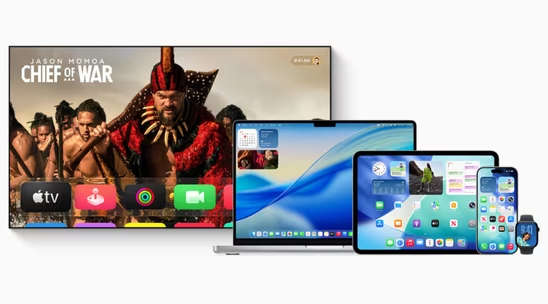
 Apple launches version 26 across iOS, macOS, iPadOS and more with new Liquid Glass design
Apple has officially released iOS 26, macOS 26 Tahoe, iPadOS 26, watchOS 26, tvOS 26, and visionOS ...
- Maoholguin published news article about iOS
 Apple unveils version 26 across its OS lineup with new design language & several features
Apple announced major operating system updates at WWDC 2025, introducing several new features acros...
- Maoholguin published news article about iOS
 Apple introduces Liquid Glass, a new design language for its ecosystem, based on VisionOS
Apple is officially rolling out a new design language called Liquid Glass across all major platform...


Recent activities
 xenmaster added macOS as alternative to Kicksecure
 AnonUser added macOS as alternative to Ageless Linux
 POX added macOS as alternative to VitruvianOS
- PierreLocus liked macOS
- mimumu liked macOS


Featured in Lists

What I use to protect my privacy that I would actually recommand to everyone to try as it does not requiere a lot of …

Just a list of some of the apps I use at home

This is a recommandation of privacy focused OS for anyone. Noob or Nerd, you should find something nice to use and …
What is macOS?
macOS is a Unix-based operating system created by Apple for its Mac computers. It boasts a user-friendly interface, high performance, and seamless integration with the Apple ecosystem.
Key features include the  Aqua Interface, system-wide Dark Mode, the Dock for quick access to commonly used applications, and
  Mission Control for easy navigation. Built-in apps include
  Safari ,
  Apple Mail ,
  Messages ,
  FaceTime , and
  Apple Photos , all optimized for performance, efficiency, and privacy.
Productivity tools like  Finder ,
  Spotlight , Quick Look, and
  Automator are also included. macOS integrates with the Apple Ecosystem through
  iCloud , Handoff, Continuity Camera, and Universal Clipboard.
Security and privacy are prioritized with features like  FileVault , Gatekeeper, System Integrity Protection (SIP), and Privacy Controls. macOS uses
  Metal for high-performance graphics rendering and computation and supports ARM-based M1 chips for improved performance and efficiency. Each new release introduces new features and enhancements.
macOS Videos

macOS information
Developed by
 Apple
Apple Licensing
Proprietary and Free product.Rating
Average rating of 3.2Alternatives
181 alternatives listedNews
36 news article related to macOSSupported Languages
- English


Comments and Reviews
I love the look and feel of this OS. I also like that it's built on a UNIX like foundation and got a real Bash terminal to do all the dirty work. This OS makes Windows feel lika a toy.
So much for doing "the dirty work" in Terminal. Try "sudo rm -rf /Applications/Stocks.app". Apple is gutting admin permissions.
I purchased a MacBook Pro in 2011 and the experience was like no other. It was horrible. The Mac took ages to turn on and was horribly slow. I am never purchasing another, nor will I reccomend one to a friend. I am currently back to using Windows and missed it for the period in which I used that Mac.
Close source, lock up, expensive OS
macOS, or “Mac OS X” back in the Tiger-ish days — when some parts of the UI where white with stripes and other brushed aluminum — was very charming and fun to use. Then it started morphing into everything it Apple criticized Windows for, and Apple being Apple; with a reputation of maybe not being the first, but definitely being the best, well… It bested Microsoft at its own awful game.
It started a slow downfall in Lion where for the first time I personally felt features were announced for the sake of features, but Apple learned how to make you renounce what you’ve thought was a given for poorer/proprietary/subscription-based implementations in exchange of tiny quality of life improvements. For instance, standards-based iChatAV, Exposé & Spaces pre-Lion was replaced for Mission Control, and Facetime which only gained some of iChatAV’s features many years later. Natural scrolling was the bargaining chip.
This was exponentially accelerated in Catalina to the point where you no longer have a say since updates are mandatory, the system disk is locked and cryptographically signed so you cannot override Apple’s will without retaliation and you cannot just install another OS because systems need to be activated now.
My first usage of macOS dates back to 2015; I had only interacted with this system once a long time ago in college. It's an OS that I quickly appreciated for its great simplicity: it gets straight to the point, avoids at all costs the tedious menus hidden within a multitude of other menus (hello, Windows!), and is an excellent OS for users who want to combine simplicity and security. Its main drawback is that it's developed by Apple, and of course, Apple has not allowed the installation of its system on hardware other than Apple hardware (although it's possible unofficially, just so you know ;D).
Mon premier usage de macOS remonte à 2015, je n'avais touché à ce système qu'une seule fois il y à fort longtemps au collège. C'est un OS que j'ai vite apprécié pour sa grande simplicité: il va droit au but, évite à tout prix d'abord des menus barbant caché dans une multitudes d'autres menus (coucou Windows !) et est un excellent OS pour des utilisateurs voulant lier grande simplicité et sécurité. Son principal problème est qu'il est développé par Apple et ce dernier n’a bien évidemment pas autoriser l'installation de son système à du hardware autre que le hardware Apple (bien que ça soit possible à titre non officiel de le faire ;D).
The most locked up operating system in the world.
Niche OS. Has some good ideas. Has some bad ideas. There are some programs, but even more are missing. You cannot fix or break your OS, depending on how you see it.