
Loremapper icon
Loremapper icon

Loremapper

 Like

Loremapper is a browser-based fantasy map editor for worldbuilding and tabletop campaigns. Create a whole planet or a flat regional map, generate a world from a seed, start from a built-in world, or sculpt the terrain by hand.
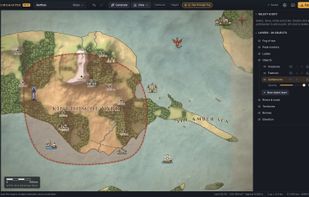
A regional fantasy map with terrain, forests, rivers, settlements, borders, labels and fog of war.

Cost / License

  • Free
  • Open Source (MIT)

Since

  • New

Updated

  • Updated Oct 2026

Platforms

  • Online  Editing requires a desktop browser with WebGL 2. Phones and tablets have a read-only viewer.
  • Self-Hosted
0likes
0articles
Save

Features

Features

Highlights All activities

Loremapper News & Activities

Recent activities

Loremapper information

AlternativeTo Category

Gaming Software

GitHub repository

  •  15 Stars
  •  1 Forks
  •  0 Open Issues
  •   Updated  
View on GitHub
Loremapper was added to AlternativeTo by LoreCreator on and this page was last updated .

No comments or reviews, maybe you want to be first?

Official Links

What is Loremapper?

Loremapper is a browser-based fantasy map editor for worldbuilding and tabletop campaigns. Create a whole planet or a flat regional map, generate a world from a seed, start from a built-in world, or sculpt the terrain by hand.

Terrain has elevation, so coastlines, shaded mountains and contour lines follow the landscape. The world generator uses tectonic plates, erosion and climate to create terrain, rivers and biomes. You can keep editing the result: shape mountain ranges, paint biomes, draw rivers, roads and borders, place illustrated objects, and add labels. Custom PNG, WebP and SVG artwork can be imported into the asset library.

Fog of war lets you hide unexplored areas and export a player-facing map. Exports include high-resolution PNG images, heightmaps and editable .loremap project files. Planet maps can also be viewed and exported in several projections.

Maps and imported artwork are saved locally in the browser; no account is required. Loremapper can also be self-hosted, including with Docker. It is free and released under the MIT License, with English and Russian interfaces.

The project is currently in alpha. Editing requires a desktop browser with WebGL 2; phones and tablets have a read-only viewer. Exporting project backups is recommended because clearing browser storage removes locally saved maps.