LogonExpert Autologon icon

LogonExpert Autologon

LogonExpert is a Windows automatic logon tool for personal computers and corporate servers that secures the autologon process by storing the logon credentials AES-256 encrypted. A user can be logged on automatically on Windows startup (with optional post-logon desktop locking)...
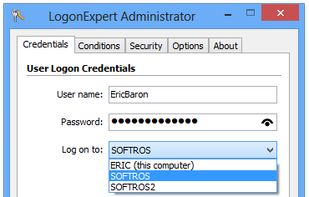
Autologon credentials

Cost / License

  • Paid
  • Proprietary

Platforms

  • Windows
0likes
0articles
Save

Features

Features

Highlights All activities

LogonExpert Autologon News & Activities

Recent activities

No activities found.

LogonExpert Autologon information

LogonExpert Autologon was added to AlternativeTo by SergRozhkov on and this page was last updated . LogonExpert Autologon is sometimes referred to as LogonExpert, Autologon. 

No comments or reviews, maybe you want to be first?

Official Links

Install from the command line

  • winget install -e --id Softros.LogonExpert

Be careful what you paste into a terminal. Check what a command installs before running it.

What is LogonExpert Autologon?

LogonExpert is a Windows automatic logon tool for personal computers and corporate servers that secures the autologon process by storing the logon credentials AES-256 encrypted. A user can be logged on automatically on Windows startup (with optional post-logon desktop locking), with a scheduled logon task, or by means of a special command line utility that can be used locally, remotely or through a script. In addition to logon tasks, a built-in scheduler allows you to set up logoff tasks as well. Options to wake the computer up after a scheduled logon and put it to sleep after a scheduled logoff are also available. The command line utility that comes with LogonExpert can help system administrators configure basic LogonExpert settings and execute custom logon/logoff/lock/re-logon scenarios network wide. Multi-user logon (any number of users) with command line is supported. Silent deployment over the company network is also possible.
