LockLines helps you create custom macOS lock screen messages that fit the small message area cleanly.
Instead of guessing how your text will appear on the lock screen, you can design it visually, apply custom font styling, preview what shows first, place private details below the first visible area, and copy a finished plain-text message into System Settings.
Use LockLines for owner notes, contact information, device labels, test machines, asset tags, recovery instructions, or any short message you want visible before someone signs in.
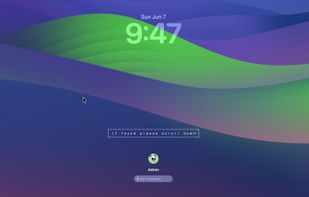
A practical use case is lost-device contact info. You can show a simple visible message such as "If found, scroll down", while keeping your email, phone number, or return instructions below the initially visible part of the lock screen message. This helps avoid exposing contact details at a glance when your MacBook is in a public place, while still making the information available to someone who finds it and scrolls down.
Once the message is set in macOS, it remains part of the standard lock screen message and is preserved across reboots.
Features:
- Create visible lock screen text
Write the message that appears first on the lock screen before scrolling.
- Place details below the first view
Keep contact details, recovery instructions, or longer notes lower in the message, so they are not visible immediately at a glance.
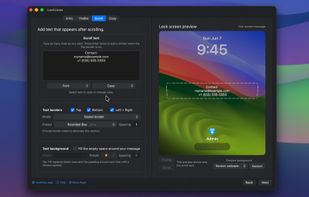
- Add scrollable text
Add extra lines that appear after the user scrolls down, useful for longer contact details or instructions.
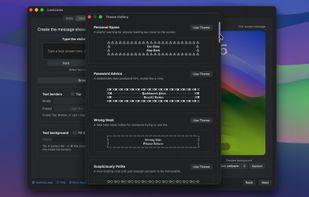
- Browse ready-made themes
Start from predefined visual themes with sample text, borders, spacing, and message structure already set up. Pick a theme, then edit it to match your needs.
- Live lock screen preview
See an approximate preview of how the message will look before copying it.
- Change the preview background
Switch the preview background to see how your message looks over different wallpapers.
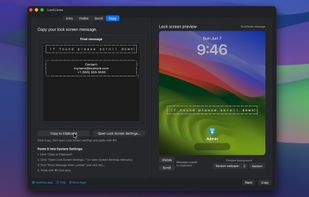
- Plain-text output
LockLines creates plain text that can be pasted into the macOS lock screen message field. No special files, profiles, or background services are required.
- Custom font styling
Choose custom fonts to give your lock screen text a unique look.
- Text borders and fills
Decorate your message using repeated characters, borders, spacing, and optional background fill around the text.
- Separate visible and scroll sections
Design the first screen message and the scroll-down message separately, then combine them into one final output.
- Saved automatically
Your text is kept across app restarts, so you can continue where you left off.
- Copy and open settings
Copy the final message and open Lock Screen settings from the app.
LockLines does not change your lock screen wallpaper or bypass macOS settings. It helps you compose the text message, then you paste it into the standard macOS lock screen message setting.









 Ihor July
No comments or reviews, maybe you want to be first?