Real-time speech translation and dictation for iPhone and iPad — the free companion to LLT Desktop.
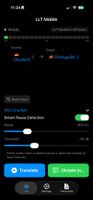
Speak → Transcribe → Translate → Speak back. Use your iPhone as a wireless microphone for your Mac, dictate into any Mac app, and send live subtitles to OBS, VRChat and vMix. With your own Mac running LLT, nothing leaves your network — no cloud, no API keys.
KEY FEATURES
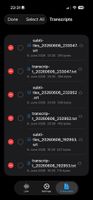
• Live speech-to-text in 40+ languages, instant translation between any language pair • Wireless mic for LLT Desktop — start translation or dictation on your Mac from your phone • Dictation mode — type straight into apps on your Mac, or save it on the iPhone as a note (original, translation or both) • Live subtitles over local Wi-Fi: vMix titles, OBS browser source, VRChat chatbox (OSC) — all at once • Fully customisable overlay (colours, opacity, border), applied in the app and in OBS • Text-to-speech playback of the translation; original text on or off • Transcripts as timestamped TXT and SRT, built-in viewer, iCloud sync to your Mac • Keeps working in the background; universal app for iPhone and iPad
LOCAL MODE — GDPR-COMPLIANT
The LLT backend runs on your own hardware — a Mac with Apple Silicon, or a machine with an NVIDIA GPU. Audio goes from your iPhone over local Wi-Fi and is processed entirely on your hardware: Whisper for transcription, Mistral for translation. Ideal for schools, hospitals, law firms, government and broadcasters with strict data protection needs.
5 SPEECH ENGINES
• LLT Backend — your own machine, local Whisper + Mistral, no cloud (free) • OpenAI Whisper — highest transcription quality • Deepgram — fastest real-time streaming • Google Cloud Speech — 125+ languages, built-in translation • Azure Speech — enterprise-grade, built-in translation, low latency
FOR BROADCAST AND CREATORS
Send translated captions straight into your vMix title inputs without touching the production computer — your iPhone becomes the translation appliance. Import transcripts into YouTube, Final Cut, Premiere or DaVinci, or share them via AirDrop and Mail.
PRIVACY
In local mode everything stays on your network. With a cloud engine you use your own API key and audio goes directly to that provider, never through Adelvo Software. iCloud sync uses your own iCloud only. No analytics, no tracking, no telemetry.
PRICE
The app and the local LLT Backend mode are free. A one-time in-app purchase unlocks the four cloud engines (you pay the provider for usage with your own key). No subscription.
REQUIREMENTS
iOS 17 or later, iPhone or iPad, Wi-Fi. For local mode and the Mac features: LLT Desktop on your Mac. For cloud engines: your own API key.
Developed by Adelvo Software. Part of the LLT family alongside LLT Desktop for Mac and ATB for broadcast.









 EU
EU
 Mathias Schneider added LLT Mobile as alternative to Microsoft Translator, Google Translate, TranslateYou, SimplyTranslate and 7 more
 Mathias Schneider


No comments or reviews, maybe you want to be first?