
LinkSpan icon
LinkSpan icon

LinkSpan

 Like

Browse files on any PC, Mac, Linux or cloud drive from one web app. Copy, move and schedule transfers between computers, cloud and FTP, sent direct.
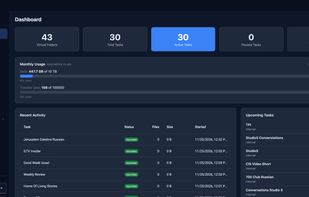
Dashboard showing the general state of the system

Cost / License

  • Freemium (Subscription)
  • Proprietary

Application type

Since

  • New

Platforms

  • Windows
  • Mac
  • Linux
0likes
0articles
Save

Features

Properties

Features

Highlights All activities

LinkSpan News & Activities

Recent activities

LinkSpan information

  • Developed by

    Unknown
  • Licensing

    Proprietary and Freemium product.
  • Pricing

    Subscription ranging between $10 and $150 per month + free version with limited functionality.
  • Alternatives

    6 alternatives listed
  • Badge

    Get an embeddable badge for LinkSpan
  • Supported Languages

    • English

AlternativeTo Categories

Backup & Sync, Office & Productivity
LinkSpan was added to AlternativeTo by dejanseke on and this page was last updated .

No comments or reviews, maybe you want to be first?

What is LinkSpan?

LinkSpan is a web app for reaching and moving files across all your computers and cloud storage from one browser window.

Install a small agent on each Windows, Mac or Linux machine. Its folders then appear next to your Dropbox, Google Drive, OneDrive, Amazon S3, FTP/SFTP and network shares, so every location works like an ordinary folder. The agent connects out to LinkSpan, so there are no ports to open, no static IP and no VPN.

• Browse, search and preview files on machines you're not sitting at • Copy, cut and paste between any two locations: PC to PC, PC to cloud, cloud to cloud • Save a transfer as a scheduled task with file filters, and it runs on its own • Run history, failure alerts and a daily email report • You choose which folders each agent exposes; nothing else can be opened

File data goes directly between your machines and your storage.

Free plan available; paid plans for teams and businesses.