
Lilo Mac Browser icon

Lilo Mac Browser

 Like

A native Mac browser on WebKit, not Chromium, with Arc-style spaces, Chrome extensions, terminal tabs in the sidebar and a built-in MCP server for AI agents.
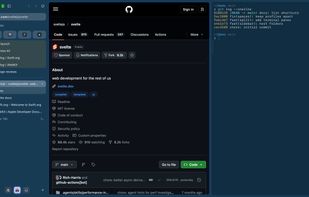
Dark appearance: Spaces and folders in the sidebar, a page, and a terminal tab split beside it.

Cost / License

  • Free
  • Open Source (MIT)

Application type

Since

  • New

Updated

  • Updated Oct 2026

Platforms

  • Mac
0likes
0articles
Save

Features

Properties

Features

Highlights All activities

Lilo Mac Browser News & Activities

Recent activities

Lilo Mac Browser information

AlternativeTo Categories

Web Browsers, Development, Education & Reference, AI Tools & Services

GitHub repository

  •  4 Stars
  •  2 Forks
  •  0 Open Issues
  •   Updated  
View on GitHub
Lilo Mac Browser was added to AlternativeTo by Alexays on and this page was last updated .

No comments or reviews, maybe you want to be first?

Official Links

What is Lilo Mac Browser?

Lilo is a free and open source (MIT) web browser for macOS, written natively in Swift and AppKit on the WebKit engine that ships with macOS. It bundles no browser engine and no Electron, so pages run in Apple's sandbox and get Apple's security fixes with every macOS update.

It keeps the habits of Arc users: Spaces with their own profiles, nested and lockable folders, pinned tabs, Peek, a Little window, split view of up to four tabs, an Arc shortcut preset, and an importer for Arc spaces, pinned tabs and folders (plus Safari, Firefox, Zen and Chromium browsers). Tabs can sit in a sidebar on the left or the right, or in a strip at the top or the bottom.

Chrome Web Store extensions install with an "Add to Lilo" button and run on WebKit's native extension runtime. Ads and trackers are blocked out of the box, and Lilo has no account, no telemetry and no AI of its own.

For developers, terminal tabs built on libghostty live in the sidebar next to your pages, with each repository's branch and pending changes, a Changes view of the diff, and a keep-awake mode while a long command runs. A built-in MCP server lets AI agents such as Claude Code, Codex or Cursor drive a real browser in their own Space, and Lilo asks the user before an agent sends, pays, deletes or publishes anything.

Lilo needs macOS 26 and is in public beta.