
Life Manager Pro
Records your Mac meetings without a bot, transcribes them on-device with Whisper, and turns the action items into real tasks alongside your projects, CRM, and goals.
Cost / License
- Pay once
- Proprietary
Application types
Platforms
- Mac
Features
Properties
- Privacy focused
- Local-First
Features
- No Tracking
- Reminders
- Subtasks
- No Coding Required
- Full-Text Search
- Goal Tracking
- Recurring Tasks
- WYSIWYG Support
- Goal Setting
- Calendar View
- Calendar Integration
- Dark Mode
- Kanban Board
Sync with Google Calendar
- Works Offline
- Ad-free
- Offline
- Meeting Recording
- No Subscription
- Speech to text
Life Manager Pro News & Activities
Recent activities
- laymance added Life Manager Pro
laymance added Life Manager Pro as alternative to Granola, Otter.ai, Fireflies.ai and Meetily
Life Manager Pro information
What is Life Manager Pro?
Life Manager Pro is a native macOS app that combines meeting capture, tasks and projects, a personal CRM, goals and habits, notes, a journal, and calendar sync into one local-first application.
It detects Zoom, Microsoft Teams, Webex, and Slack calls and offers to record them. Nothing joins the meeting as a participant — audio is captured directly from the Mac, with microphone and system audio as separate streams. Transcription runs on-device using Whisper, so the audio never leaves the machine and it works with no network connection.
Extracted action items become real tasks alongside the projects and goals they belong to, and meeting attendees link to CRM contacts. An optional AI analysis step produces summaries and decisions using your own Anthropic or OpenAI API key, sending transcript text only, never audio. It can be disabled entirely.
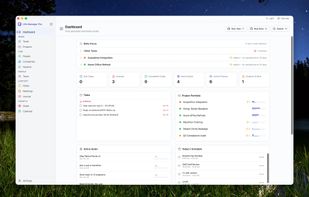
The rest of the app: two-way calendar sync via EventKit, tasks and projects in table, kanban, and Gantt views with saved custom views and custom fields on any record, a CRM with people, companies, and a deal pipeline, goals and OKRs, a block-based notes editor, a journal, and global search.
All data lives in a SQLite database on your Mac. There is no account and no cloud sync.
Single-user and Mac-only by design — no mobile app, no team collaboration, no shared workspaces.


