





LayerGrab AI
Like
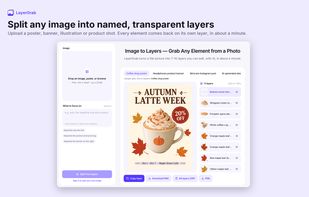
LayerGrab splits a flat image, such as a poster, banner, product photo or illustration, into editable layers. Each main element comes back on its own transparent layer with a descriptive name, up to 16 layers per image, and the background behind the elements is filled in, so you...

Cost / License
- Freemium (Pay once or Subscription)
- Proprietary
Since
- New


Features
Highlights All activities
LayerGrab AI News & Activities
Recent activities
- Lucas-Lewis added LayerGrab AI
 Lucas-Lewis added LayerGrab AI as alternative to Image to Layers AI, Canva and IntoLayers
Developed by
LayerGrabLicensing
Proprietary and Freemium product.Pricing
One time purchase ranging between $20 and $60, and / or subscription ranging between $12 and $36 per month + free version with limited functionality.Alternatives
3 alternatives listedBadge
Get an embeddable badge for LayerGrab AISupported Languages


No comments or reviews, maybe you want to be first?