Why Kinoklip?
On Windows or macOS: use Resolve. Kinoklip isn't available there yet, and Resolve is the more complete and more mature editor, made by people paid to work on it full time. Its free version is excellent, and buying Studio supports the people who made the workflow Kinoklip copies.
On Linux, Resolve runs, but its support is minimal: a short list of supported distributions, NVIDIA-first GPU support, and no H.264 or H.265 in the free version. Kinoklip gives you:
Smooth editing on modest hardware. GPU decoding (VA-API) on Intel and AMD, GPU compositing, the next clip prepared before a cut. Keyframes, titles and animations play without lag on integrated graphics.
H.264, H.265 and AAC for free, for import and export.
Microphone recording that works through PipeWire or PulseAudio, on Wayland and X11 (how).
Any GPU with OpenGL 3.3: AMD, Intel and NVIDIA, integrated graphics included.
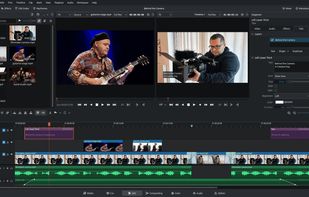
The same layout and shortcuts as Resolve, plus presets for Premiere Pro, Final Cut Pro, Vegas and others.
One AppImage for every distribution, x86_64 and ARM64.
Free and open source (GPL-3.0).











No comments or reviews, maybe you want to be first?