

KidFill icon
KidFill icon

KidFill

 Like

Fill school and camp forms with your child's allergies, insurance and emergency contacts, saved once and kept on your own computer. Free for one child.
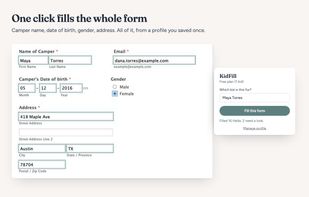
KidFill screenshot 1

Cost / License

  • Freemium (Pay once)
  • Proprietary

Since

  • New

Platforms

  • Google Chrome
0likes
0articles
Save

Features

Highlights All activities

KidFill News & Activities

Recent activities

KidFill information

  • Developed by

    US flagInstinct Labs
  • Licensing

    Proprietary and Freemium product.
  • Pricing

    One time purchase (perpetual license) that costs $13 + free version with limited functionality.
  • Alternatives

    3 alternatives listed
  • Badge

    Get an embeddable badge for KidFill
  • Supported Languages

    • English
KidFill was added to AlternativeTo by Dawn Jain on and this page was last updated .

No comments or reviews, maybe you want to be first?

What is KidFill?

KidFill fills in school and camp forms with the details Chrome's autofill doesn't know: allergies, medical conditions, medications, the pediatrician's name and phone, insurance group and policy numbers, emergency contacts, grade, shirt size and swim level. You save your child's details once, so the next camp registration or field trip slip doesn't send you digging for the insurance card. It can hold a second parent or guardian too, even one at a different address.

On any school or camp form, pick your child and click Fill. KidFill fills every field it recognizes and outlines anything it wasn't sure about, so you can check it. It never submits a form, checks a checkbox or agrees to a waiver for you. It's tested on registration forms built with Jotform, Google Forms and Wufoo.

Your family's details stay in your browser, on your own computer, and are never uploaded or synced elsewhere. KidFill has no server, no account and no login. One child's profile is free, forever. If you have more than one, it's a single $12.99 payment with no subscription.