
KeycoBoard icon
KeycoBoard icon

KeycoBoard

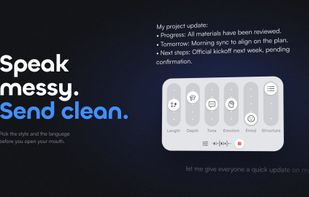
Voice typing and rewriting for Mac and iPhone. Set the tone, length and language with sliders, and the result lands right in your text field.
KeycoBoard screenshot 1

Cost / License

  • Freemium (Pay once or Subscription)
  • Proprietary

Platforms

  • Mac  Requires macOS 14 or later.
  • iPhone  Requires iOS 16.6 or later.
  • iPad  Requires iPadOS 16.6 or later.
1like
0articles
Save

Features

  1.  Voice dictation
  2.  Speech to text
  3.  AI Writing

KeycoBoard News & Activities

Highlights All activities

Recent activities

KeycoBoard information

  • Developed by

    Orsen Shen
  • Licensing

    Proprietary and Freemium product.
  • Pricing

    One time purchase that costs $30, and / or subscription that costs $4 per month + free version with limited functionality.
  • Alternatives

    2 alternatives listed
  • Badge

    Get an embeddable badge for KeycoBoard
  • Supported Languages

    • English
    • French
    • German
    • Italian
    • Japanese
    • Korean
    • Russian
    • Chinese
    • Spanish

AlternativeTo Category

AI Tools & Services

Apple AppStore

  •   Updated 
  •   4 avg rating
View in AppStore

Popular alternatives

View all
KeycoBoard was added to AlternativeTo by keycoboard on and this page was last updated .

No comments or reviews, maybe you want to be first?

Official Links

What is KeycoBoard?

KeycoBoard is AI voice typing and rewriting for iPhone, iPad and Mac. Speak, or select text you have already written, then use sliders to set the length, tone, depth and structure, or switch it into another language. The result goes straight back into the text field you are in.

Voice typing you can steer: pick the style before you talk, or speak straight into another language.

Slider rewriting: select existing text and adjust length, depth, tone, emotion, emoji and structure, with 9,375 combinations. The same controls work for voice input and rewriting.

In-place translation: speak or type in your own language and get the target language where you are writing.

Context-aware: generation uses the content already in the text field to match its format and wording.

One account on Mac and iPhone: use a shortcut on Mac, or the keyboard on iPhone and iPad.

Generation history is stored on your device and can be deleted or cleared automatically. Voice typing, rewriting and translation require an internet connection.

Free: 30 uses per month across voice typing and standard-model rewriting and translation. Pro: US$3.99/month or US$29.99/year. Mac requires macOS 14+; iPhone and iPad require iOS/iPadOS 16.6+.

KeycoBoard Videos