Java Decompiler icon

Java Decompiler

The “Java Decompiler project” aims to develop tools in order to decompile and analyze Java 5 “byte code” and the later versions.
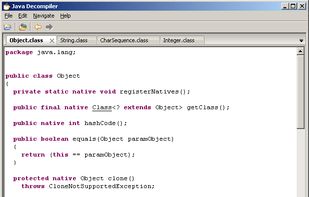
Java 5 classes decompiled by JD-Core.

Cost / License

Application type

Platforms

  • Mac
  • Windows
  • Linux
  • Eclipse
  • IntelliJ IDEA
  • Java
16likes
0articles
Save

Features

Java Decompiler News & Activities

Highlights All activities

Recent activities

  • JD-GUI-DUO icon
    Nicolas Baumann added Java Decompiler as alternative to JD-GUI-DUO
  • Nicolas Baumann reviewed Java Decompiler  

    I’d like to suggest an alternative JD-GUI-DUO

Java Decompiler information

AlternativeTo Category

Development

GitHub repository

  •  15,208 Stars
  •  2,473 Forks
  •  248 Open Issues
  •   Updated  
View on GitHub

Our users have written 2 comments and reviews about Java Decompiler, and it has gotten 16 likes

Java Decompiler was added to AlternativeTo by LionArt on and this page was last updated . Java Decompiler is sometimes referred to as JD-Core, JD-GUI, JD-Eclipse, JD-IntelliJ, JD. 

Comments and Reviews

   
Top Positive Comment
0

I love this program! It makes it so easy to view the source code of a program and is free and open-source and cross platform. Don't need to install Eclipse just to view code! Just run the program and open the location of the file you want to debug and that's it!

Nicolas Baumann
0

I’d like to suggest an alternative JD-GUI-DUO

Review from a new or low-activity account — shown here, but not counted in the app rating.

Official Links

Install from the command line

  • flatpak install flathub io.github.java_decompiler.jd-gui

Be careful what you paste into a terminal. Check what a command installs before running it.

What is Java Decompiler?

The “Java Decompiler project” aims to develop tools in order to decompile and analyze Java 5 “byte code” and the later versions.

JD-Core is a library that reconstructs Java source code from one or more “.class” files. JD-Core may be used to recover lost source code and explore the source of Java runtime libraries. New features of Java 5, such as annotations, generics or type “enum”, are supported. JD-GUI and JD-Eclipse include JD-Core library.

JD-GUI is a standalone graphical utility that displays Java source codes of “.class” files. You can browse the reconstructed source code with the JD-GUI for instant access to methods and fields.

JD-Eclipse is a plug-in for the Eclipse platform. It allows you to display all the Java sources during your debugging process, even if you do not have them all.

JD-IntelliJ is a plug-in for... the IntelliJ IDE.

JD-Core, JD-GUI & JD-Eclipse are open source projects released under the GPLv3 License.
