

JapanMedAssist DICOM Viewer icon

JapanMedAssist DICOM Viewer

 Like

Free online DICOM viewer that opens CT, MRI and PET scans from a ZIP, CD folder or .dcm files in your browser, with MPR and 3D, without uploading anything.
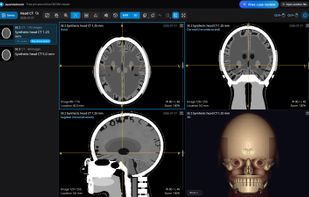
UI display with generic data

Cost / License

  • Free
  • Proprietary

Application type

Since

  • New

Platforms

  • Online
0likes
0articles
Save

Features

Properties

Features

Highlights All activities

JapanMedAssist DICOM Viewer News & Activities

Recent activities

JapanMedAssist DICOM Viewer information

JapanMedAssist DICOM Viewer was added to AlternativeTo by Cyril-Kay on and this page was last updated .

No comments or reviews, maybe you want to be first?

What is JapanMedAssist DICOM Viewer?

JapanMedAssist DICOM Viewer is a free web-based viewer for medical images such as CT, MRI, PET and X-ray. It opens what hospitals actually hand out: a DICOM ZIP file, the unzipped folder from a CD or DVD (with or without a DICOMDIR), or loose .dcm files. Everything is read inside your browser. Files are never uploaded to a server, and there is nothing to install.

Features:

  • Multiplanar reconstruction (axial, coronal and sagittal planes) with oblique planes and MIP, MinIP or average slabs
  • 3D volume rendering of CT and MRI with bone, soft-tissue, lung and vessel styles
  • Window/level with CT presets, zoom, pan, rotate, invert and cine playback
  • Length and angle measurements
  • Up to four series side by side with synced scrolling and cross-reference lines
  • DICOM tag browser that hides patient-identifying fields by default
  • Runs in current Chrome, Edge, Firefox and Safari on Windows, macOS, Linux and ChromeOS; phones and tablets open ZIP files
  • Built-in synthetic sample scan, so you can try it without your own images
  • Interface in 10 languages

The viewer is for viewing only, not for diagnosis, and is not a medical device.