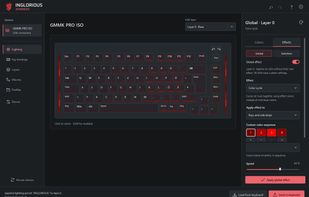
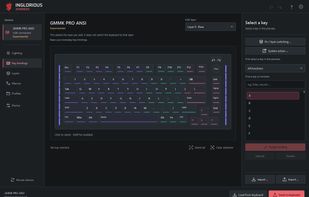
INGLORIOUS Advanced is a free, open-source alternative to Glorious CORE for selected Glorious keyboards. It provides per-key and side lighting, animated effects, key and knob assignments, a shared macro library and four layers. After transferring a configuration, the keyboard runs its lighting, bindings and macros without the app staying open.
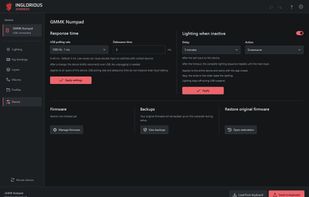
The app includes color favorites, lighting templates, profiles, import and export, standby lighting, and adjustable polling rate and debounce time. The GMMK Numpad slider can control its lighting brightness, relative volume or MIDI. Optional shared dimming between devices requires the app to remain running.
INGLORIOUS uses custom firmware built on QMK. Installing it replaces the keyboard's original firmware. The guided setup creates and checks an original-firmware backup before installation, and the app provides a way to restore that backup. Keep a separate copy: the backup covers internal firmware, not every external profile memory or wireless component. Firmware changes are made at the user's own risk.
Windows x64 is the main platform. Native macOS and Linux packages are available as Early Alpha builds; their physical-device testing is still pending.
Hardware used or tested on Windows:
- GMMK PRO revision 1, ISO.
- GMMK Numpad: USB only. Bluetooth does not work with INGLORIOUS firmware.
- GMMK 3 PRO 100% ISO, wired and non-HE only. This status does not cover other GMMK 3 PRO sizes, layouts or hardware variants.
Experimental variants, with firmware available but physical testing still pending:
- GMMK PRO revision 1 ANSI, and revision 2 ANSI/ISO.
- GMMK 2 65% and 96%, ANSI/ISO.
- GMMK 3 65%, 75% and 100%, wired non-HE, ANSI/ISO.
Other GMMK 3 PRO variants, Hall-effect models, GMBK, GMMK Eternal and wireless modes are not supported. Check the exact model, layout and hardware revision before installation. Support does not extend to Glorious mice or to keyboards from other manufacturers.
This is an independent project, not affiliated with or endorsed by Glorious.










No comments or reviews, maybe you want to be first?